
When designing high-performance Azure Virtual Desktop (AVD) environments, reducing latency between infrastructure components is often critical.
One feature in Azure designed to help with this is Proximity Placement Groups (PPG). While not always required, PPGs can significantly improve performance for workloads that depend on low network latency between resources.
This blog explains:
- What Proximity Placement Groups are
- Why they exist
- When to use them
- How they benefit Azure Virtual Desktop environments
What Are Azure Proximity Placement Groups?
A Proximity Placement Group (PPG) is an Azure resource that allows you to physically place virtual machines close together within the same data centre infrastructure.
Normally, Azure distributes resources across racks within a data centre to maximise availability. While this improves resilience, it can introduce slightly higher network latency between resources.
A PPG changes this behaviour by instructing Azure to place compute resources as close together as possible.
This results in:
- Reduced network latency
- Improved communication between services
- Better performance for latency-sensitive workloads
Microsoft documentation: https://learn.microsoft.com/en-us/azure/virtual-machines/co-location
Why Proximity Placement Groups Exist
Some workloads require very low latency communication between compute resources.
Examples include:
- High-performance computing (HPC)
- Financial trading platforms
- Real-time analytics
- Large database clusters
- GPU workloads
For these types of applications, even small increases in network latency can impact performance.
Proximity Placement Groups allow Azure to optimise physical placement within a data centre to support these workloads.
When Should You Use Proximity Placement Groups?
PPGs should be considered when workloads require fast communication between multiple Azure resources.
Typical scenarios include:
Latency-Sensitive Applications
Applications that rely on frequent communication between servers.
Distributed Compute Workloads
Clusters where nodes continuously exchange data.
Database and Application Tier Deployments
When application servers must communicate rapidly with backend databases.
Azure Virtual Desktop Deployments
Where session hosts frequently communicate with profile storage, identity services, and application services.
Benefits of Using PPG with Azure Virtual Desktop
For most Azure Virtual Desktop deployments, PPGs are optional, but in some scenarios they can provide measurable improvements.
Reduced Latency Between Session Hosts and Storage
AVD session hosts frequently interact with FSLogix profile containers, which are typically stored on:
- Azure Files
- Azure NetApp Files
Placing session hosts in a Proximity Placement Group can reduce latency when accessing these storage services.
Improved User Login Performance
Profile loading during login can be sensitive to storage latency.
Lower latency between session hosts and storage can help improve:
- Login times
- Profile mount speed
- Application launch performance
Better Performance for GPU-Based Workloads
In GPU-enabled AVD environments, session hosts may rely on additional services or storage layers.
Reducing network latency can improve responsiveness for workloads such as:
- 3D rendering
- CAD applications
- AI workloads
Consistent Performance Across Session Hosts
Without PPGs, Azure may distribute VMs across different racks within a data centre.
PPGs help ensure session hosts are placed closer together, improving consistency of network performance.
Important Considerations Before Using PPG
Although PPGs offer performance benefits, they also introduce some limitations.
Because Azure must place resources within the same infrastructure location, you may encounter capacity limitations.
For example, certain VM sizes may not always be available within a specific PPG.
Reduced Placement Flexibility
Azure normally spreads resources for resilience. Using a PPG restricts this behaviour.
This can impact:
- VM allocation
- Scaling operations
- Availability options
Best Used for Specific Workloads
PPGs are most valuable when low latency between resources is critical.
For many standard AVD deployments, the performance difference may be minimal.
How to Configure a Proximity Placement Group
Creating a PPG is straightforward.
Create a PPG
In Azure Portal:
- Go to Create Resource
- Search for Proximity Placement Group
- Select Create
Provide:
- Name
- Resource group
- Region
Using PPG with Azure Virtual Desktop
When deploying AVD session hosts:
- Ensure your VM sizes are supported
- Deploy session hosts into the PPG
- Validate performance and capacity
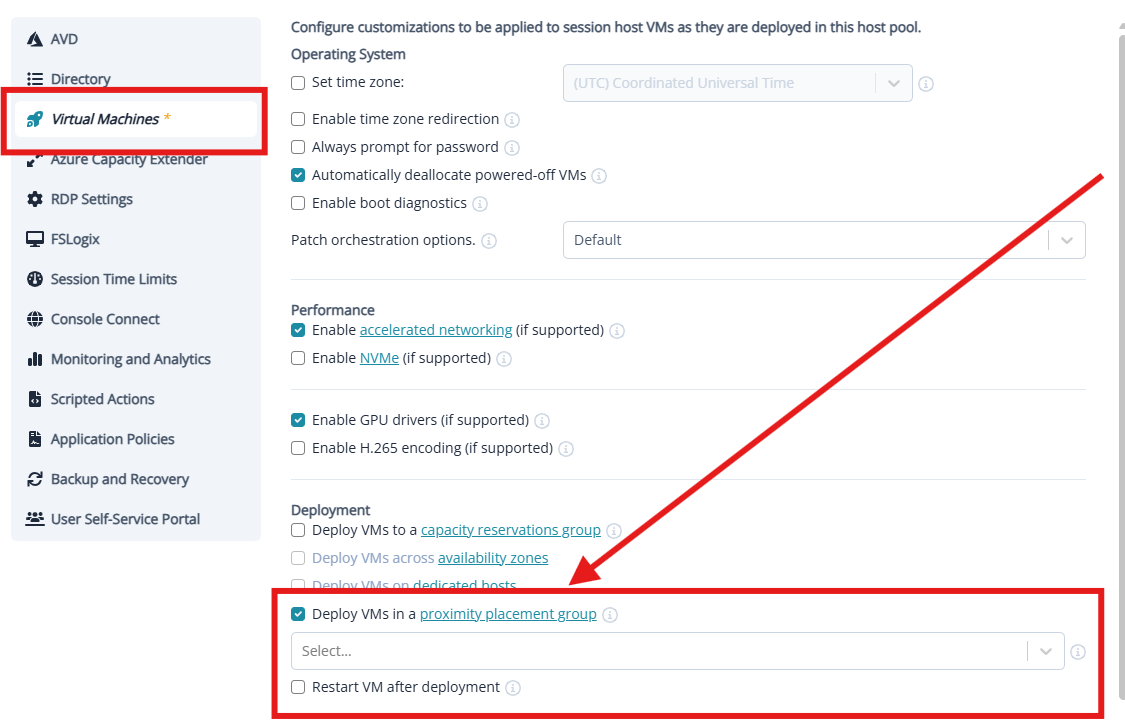
For Nerdio-managed environments, session hosts can be deployed into a PPG through the VM deployment configuration.
Final Thoughts
Proximity Placement Groups are a powerful Azure feature that allows organisations to optimise physical placement of compute resources for improved performance.
For Azure Virtual Desktop environments with latency-sensitive workloads, they can help reduce storage access latency and improve overall user experience.
However, they should be used thoughtfully due to potential capacity and placement constraints.
Understanding when and how to use PPGs allows organisations to balance performance, scalability, and resilience in their AVD architecture.
Click Here To Return To Blog