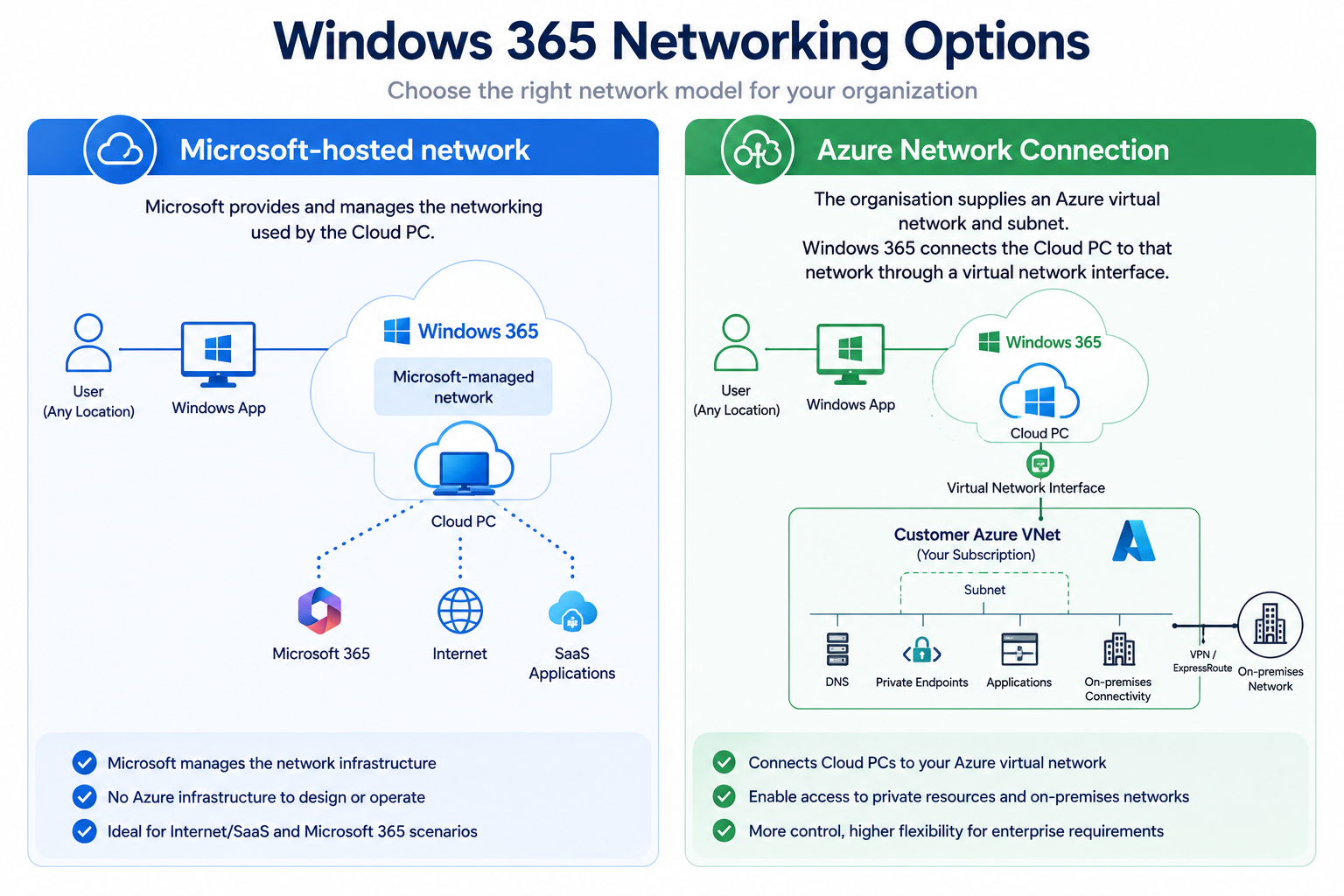
Windows 365 removes the need to manage the underlying Cloud PC infrastructure, but networking remains an architectural decision. Choosing between a Microsoft-hosted network and an Azure Network Connection determines how much networking you manage, how Cloud PCs reach private applications, where DNS is resolved, and how much control you have over traffic flows.
Introduction
One of the most important decisions when designing Windows 365 is also one of the easiest to misunderstand:
Should Cloud PCs use a Microsoft-hosted network or an Azure Network Connection?
Both options provide connectivity for Windows 365 Cloud PCs, but they solve different requirements.
A Microsoft-hosted network gives Microsoft responsibility for much of the underlying network infrastructure.
An Azure Network Connection (ANC) connects Cloud PCs to an Azure virtual network managed by your organisation. Microsoft defines an ANC as the mechanism that lets Cloud PCs be provisioned with connectivity to a virtual network you manage. (Microsoft Learn)
The correct choice should be driven by:
Identity → Applications → Data → DNS → Private Connectivity → Security → User Experience → Resilience
rather than simply selecting the architecture most similar to the organisation's existing physical desktop estate.
Understanding the Two Windows 365 Network Models
At a high level, Windows 365 Enterprise provides two networking approaches for Microsoft Entra joined Cloud PCs.
Microsoft-hosted network
Microsoft provides and manages the networking used by the Cloud PC.
This dramatically reduces the amount of Azure infrastructure the customer needs to design and operate.
Azure Network Connection
The organisation supplies an Azure virtual network and subnet.
Windows 365 then connects the Cloud PC to that network through a virtual network interface.
The Cloud PC itself still runs within Microsoft's Windows 365 infrastructure — it isn't simply a normal VM deployed into your Azure subscription. The ANC provides connectivity into the customer-managed Azure network. (Microsoft Learn)
That distinction is important.
Microsoft-Hosted Network
For a Microsoft Entra joined Cloud PC, administrators can select:
Microsoft hosted network
(during creation of the Windows 365 provisioning policy.)
Microsoft then handles the Cloud PC's underlying network infrastructure.
This is an attractive architecture for organisations where users primarily consume:
- Microsoft 365
- SaaS applications
- Internet-based services
- Cloud-native applications
- Services accessible through modern secure-access technologies
It also removes many traditional networking dependencies.
You don't need to provide an Azure VNet simply to deploy Microsoft Entra joined Cloud PCs using the Microsoft-hosted network. Microsoft's current requirements explicitly state that there are no domain requirements for Microsoft Entra joined Cloud PCs on a Microsoft-hosted network. (Microsoft Learn)
Microsoft-Hosted Network Architecture
A simplified architecture looks like:
User Device
↓
Internet
↓
Windows 365 Service
↓
Microsoft-Managed Network
↓
Cloud PC
↓
Microsoft 365 / SaaS / Internet Services
The customer doesn't need to manage:
- Cloud PC VNet
- Cloud PC subnet
- Cloud PC NIC
- Azure route tables for the Cloud PC subnet
- Azure VPN/ExpressRoute solely for Cloud PC placement
- ANC health
- Cloud PC subnet IP capacity
This can significantly reduce operational complexity.
Geography and Region
Microsoft-hosted networking doesn't mean you lose all control over Cloud PC location.
Provisioning policies currently allow administrators to select a geography and then choose options including:
- All default regions within the geography
- A region group
- A specific region
- Multiple selected regions
There is also an Auto opt-in option that can automatically include future supported regions or region groups. (Microsoft Learn)
Microsoft currently recommends All default regions within the geography where supported.
Why?
Because Windows 365 can distribute provisioning across the available regions, improving provisioning success and resilience rather than forcing every Cloud PC into one specific Azure region. (Microsoft Learn)
Fabs Recommendation
Don't select a single region unless you have a genuine reason to do so.
The closest region isn't automatically the best architecture.
Consider:
User Location
Where does the user connect from?
Application Location
Where are their applications?
Data Location
Where does application data live?
Regulatory Requirements
Does workload placement have geographical requirements?
Resilience
Are you unnecessarily creating a regional dependency?
The design goal should be to balance latency, application proximity, data residency and resilience.
Azure Network Connection
An ANC is required when Cloud PCs need to be attached to an Azure virtual network managed by the customer.
Conceptually:
Windows 365
↓
Cloud PC
↓
Virtual NIC
↓
Customer Azure VNet / Subnet
↓
Customer Network
From that VNet, the organisation can provide connectivity to services such as:
Azure Private Resources
Hub-and-Spoke Networks
Azure Private Endpoints
Domain Controllers
Internal DNS
On-Premises Networks
through:
ExpressRoute / VPN
and potentially onward to:
Private Applications / Databases / File Services
Microsoft's documentation confirms that Windows 365 injects a vNIC into the customer-provided Azure VNet during provisioning. (Microsoft Learn)
When Is an ANC Actually Required?
This is an important distinction.
Microsoft Entra Join
An ANC is optional.
You can choose either:
Microsoft Entra Join + Microsoft-hosted network
or:
Microsoft Entra Join + Azure Network Connection
Hybrid Microsoft Entra Join
An ANC is required.
Microsoft's current provisioning documentation explicitly requires an ANC when either:
- Join type = Hybrid Microsoft Entra Join
- Join type = Microsoft Entra Join and Network = Azure Network Connection. (Microsoft Learn)
This gives us a useful decision tree:
Does the Cloud PC require Hybrid Microsoft Entra Join?
Yes → ANC required
No → Microsoft Entra Join
↓
Does it require customer-managed private network connectivity?
No → Microsoft-hosted network
Yes → Consider ANC
Microsoft Entra Join vs Hybrid Microsoft Entra Join
The networking decision and identity decision are closely related.
Microsoft Entra Join
The Cloud PC joins directly to Microsoft Entra ID.
There is no requirement for a traditional Windows Server Active Directory domain.
This architecture aligns naturally with:
- Microsoft Intune
- Conditional Access
- Modern authentication
- Cloud-native endpoint management
- Passwordless authentication
- Reduced dependency on traditional AD infrastructure
Microsoft currently supports Microsoft Entra joined Cloud PCs with either Microsoft-hosted networking or an ANC. (Microsoft Learn)
Hybrid Microsoft Entra Join
Hybrid join is different.
Windows 365 first joins the Cloud PC to the Windows Server Active Directory domain. The device can then be synchronized to Microsoft Entra ID when the environment is correctly configured for hybrid join. (Microsoft Learn)
That introduces dependencies on:
- Active Directory domain controllers
- DNS
- Network connectivity to AD
- Organisational Units
- Domain join permissions
- Microsoft Entra synchronization
The Cloud PC therefore needs network connectivity into that environment.
Hence:
Hybrid Microsoft Entra Join requires an Azure Network Connection.
Don't Choose Hybrid Join Just Because Your PCs Are Hybrid Joined
This is one of the most important architectural recommendations in this article.
Many organisations approach Windows 365 by asking:
"How do we reproduce our existing desktop environment in Windows 365?"
A better question is:
"Which legacy dependencies actually require us to reproduce it?"
If your organisation is deploying new Cloud PCs, Windows 365 provides an opportunity to reconsider whether traditional domain join is still required.
Fabs Solutions Recommendation
For greenfield Windows 365 deployments:
Prefer Microsoft Entra Join unless a documented technical dependency requires Hybrid Microsoft Entra Join.
Don't introduce:
AD + DNS + VPN/ExpressRoute + ANC + Hybrid Join
simply because that's how physical laptops have historically been deployed.
When Should I Use an Azure Network Connection?
An ANC becomes compelling when Cloud PCs genuinely require customer-controlled network access.
Typical examples include:
Private applications
Applications accessible only from corporate networks.
Azure Private Endpoints
Cloud PCs need private connectivity to PaaS services.
Internal databases
Applications communicate with privately addressed databases.
Traditional file services
Users need access to SMB shares or other internal resources.
Hybrid identity
Cloud PCs must communicate with Active Directory domain controllers.
Customer-managed DNS
Applications depend on private DNS zones or internal namespaces.
Network inspection
The organisation has specific requirements for routing Cloud PC traffic through customer-controlled security infrastructure.
Private RDP Shortpath
The organisation wants direct private UDP connectivity between managed client networks and Cloud PCs.
When Should I Use a Microsoft-Hosted Network?
Microsoft-hosted networking should be seriously considered where:
- Cloud PCs are Microsoft Entra joined
- Applications are predominantly SaaS
- Microsoft 365 is a primary workload
- Users don't require traditional private network access
- Cloud-native security architecture is being adopted
- You want to minimise Azure networking infrastructure
- You want Microsoft to handle Cloud PC regional network placement
- There is no genuine requirement for customer-managed routing
For many modern Windows 365 deployments, this should be the starting point, with an ANC introduced only when there is a technical requirement.
Microsoft-Hosted Network vs ANC
| Capability | Microsoft-Hosted Network | Azure Network Connection |
|---|---|---|
| Customer-managed VNet | No | Yes |
| Customer-managed subnet | No | Yes |
| Microsoft Entra Join | Yes | Yes |
| Hybrid Microsoft Entra Join | No | Yes |
| Private Azure connectivity | Not natively via customer VNet | Yes |
| Traditional AD connectivity | No direct customer VNet | Yes |
| Customer DNS control | Limited | Yes |
| ExpressRoute/VPN integration | No customer VNet integration | Yes |
| Customer route tables | No | Yes |
| Customer NSGs | No | Yes |
| Private RDP Shortpath | No | Yes |
| Public RDP Shortpath | Yes | Yes |
| Azure networking administration | Minimal | Customer responsibility |
| Subnet capacity planning | Microsoft managed | Customer managed |
| Operational complexity | Lower | Higher |
| Architecture flexibility | Lower | Higher |
There is an important nuance around RDP Shortpath: Microsoft's current documentation supports Shortpath for public networks with Windows 365, including Microsoft-hosted network scenarios, whereas Shortpath for private networks specifically requires Cloud PCs on customer private networking through an ANC. (Microsoft Learn)
DNS Design
DNS becomes particularly important when using an ANC.
For Hybrid Microsoft Entra Join, the Cloud PC must resolve the Active Directory domain.
Microsoft recommends configuring the Azure VNet with custom DNS servers capable of resolving the AD DS namespace. Microsoft also recommends at least two DNS servers to reduce the risk of a single name-resolution failure. (Microsoft Learn)
For example:
Cloud PC
↓
Azure VNet
↓
Custom DNS
↓
AD DNS / Private DNS
↓
Domain Controllers + Internal Applications
DNS failure can manifest as:
- ANC health failures
- Domain join failures
- Authentication problems
- Application connectivity failures
- Slow logons
- Intermittent resource access
For hybrid Windows 365 environments, DNS isn't a minor infrastructure dependency.
It is part of the Cloud PC provisioning path.
ANC Health Checks
Windows 365 doesn't simply accept an ANC configuration and assume that it works.
Microsoft performs health checks against Azure Network Connections to validate the environment.
These checks include areas such as:
- Active Directory domain join
- Microsoft Entra device synchronization
- Azure subnet IP usage
- Azure tenant readiness
- VNet readiness
- DNS resolution
- Endpoint connectivity
- Required permissions
Failures are surfaced through Microsoft Intune for troubleshooting. (Microsoft Learn)
This is particularly useful operationally because an unhealthy ANC can prevent successful Cloud PC provisioning.
Subnet Capacity Planning
When you manage the network, you also inherit responsibility for IP addressing.
Every Cloud PC using the ANC consumes an IP address from the selected subnet.
Therefore:
1,000 Cloud PCs ≠ simply create a subnet and forget about it.
You need to consider:
- Current Cloud PCs
- Growth
- Reprovisioning
- Temporary provisioning requirements
- Reserved Azure addresses
- Other resources sharing the subnet
- Future expansion
Avoid creating Windows 365 subnets that leave almost no capacity headroom.
Multiple and Alternate Azure Network Connections
This is an important capability for enterprise Windows 365 deployments.
A provisioning policy can now contain multiple ANCs.
Administrators can define their priority order.
Windows 365 uses the first healthy ANC in the list. If it isn't healthy, Windows 365 can use the next healthy ANC. (Microsoft Learn)
Conceptually:
Provisioning Policy
↓
ANC 1 – Priority 1
↓
If unhealthy
↓
ANC 2 – Priority 2
↓
If unhealthy
↓
ANC 3 – Priority 3
This is valuable for improving provisioning resilience.
Microsoft specifically describes alternate ANCs as a way to make Cloud PC provisioning more reliable where regional capacity constraints occur. (Microsoft Learn)
Important: Alternate ANC Isn't Session Failover
This distinction needs to be clear.
Alternate ANCs improve provisioning resilience.
They shouldn't be interpreted as:
Cloud PC Network Load Balancing
or:
Live Cloud PC Network Failover
The ANC configuration is applied when the Cloud PC is provisioned. (Microsoft Learn)
So:
Alternate ANC = provisioning architecture resilience, not an active-active network path for an already running Cloud PC.
ANC Permissions
Creating an ANC also introduces Azure RBAC requirements.
Windows 365 is granted:
- Reader on the Azure subscription
- Windows 365 Network Interface Contributor on the specified resource group
- Windows 365 Network User on the VNet
Microsoft documents these permissions as part of the ANC creation process. (Microsoft Learn)
This is another reason not to give Windows 365 administrators blanket Azure Owner permissions simply because they need to manage Cloud PC networking.
Apply least privilege.
Network Security and Traffic Inspection
One common enterprise design is:
Cloud PC
↓
ANC Subnet
↓
UDR
↓
Azure Firewall / NVA
↓
Internet
This provides additional control, but it also introduces another potential performance bottleneck.
Microsoft explicitly recommends direct connectivity from the Azure VNet to Azure Virtual Desktop RDP broker endpoints for lowest latency. Microsoft also warns that changing Cloud PC routes — including through VPN configuration — can break connectivity to the RDP broker and disconnect the user. (Microsoft Learn)
This is important.
Security architecture shouldn't unintentionally degrade the remote desktop experience.
Don't Hairpin Everything
A common legacy architecture looks like:
Cloud PC in Azure
↓
ExpressRoute/VPN
↓
On-Premises Datacentre
↓
Proxy / Firewall
↓
Internet
↓
Microsoft 365
This can create unnecessary:
- Latency
- Bandwidth consumption
- Firewall load
- Proxy dependency
- User-experience degradation
Cloud PCs already run in Microsoft's cloud.
Routing their Microsoft 365 traffic back through an on-premises datacentre before returning to Microsoft's cloud can be counterproductive.
Where security requirements permit, favour local/direct cloud egress for Microsoft-optimised services.
RDP Connectivity Is Different From Application Traffic
This is another important Windows 365 networking concept.
There are really two broad traffic flows:
User → Cloud PC
he remote desktop connection.
Cloud PC → Application/Data
Traffic generated from inside the Cloud PC.
These paths don't necessarily follow the same network architecture.
For example:
User in London
↓
Windows App
↓
Windows 365 Cloud PC
↓
ANC
↓
Private application
Understanding this distinction is essential when troubleshooting performance.
A user can have excellent connectivity to the Cloud PC while the application running inside it has poor connectivity to its backend.
Or the reverse.
RDP Shortpath
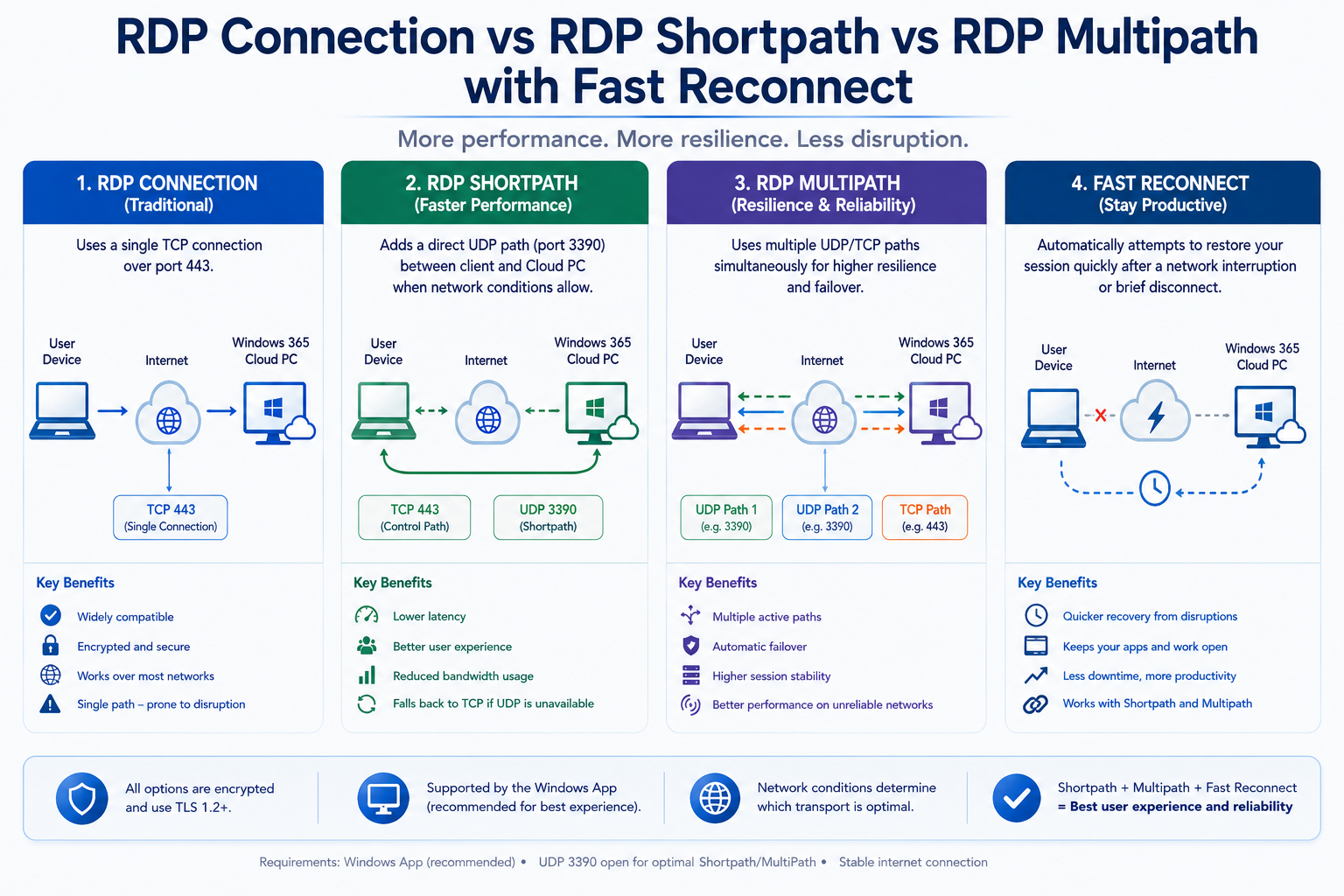
Windows 365 normally establishes remote connectivity using reverse connect over TCP 443.
RDP Shortpath adds a UDP-based transport where possible.
Microsoft currently supports Shortpath for public networks with Windows 365 and recommends keeping it enabled wherever possible. If direct UDP via STUN isn't available, TURN can provide a relay path; Microsoft specifically advises keeping TURN enabled because disabling it can reduce successful UDP connections and cause fallback to TCP. (Microsoft Learn)
For private networking, Shortpath can create a direct UDP path between the client and Cloud PC over the customer-managed network.
Private Shortpath requires:
- ANC/customer private network
- Direct line-of-sight
- UDP 3390 by default
- Appropriate firewall/NSG configuration
and can work over technologies such as ExpressRoute private peering or VPN. (Microsoft Learn)
RDP Multipath
Windows 365 networking has also evolved beyond a single RDP transport path.
RDP Multipath can provide multiple transport paths to improve session resilience.
Microsoft's current guidance recommends Windows App 2.0.1069.0 or later and RDP Shortpath as the primary transport for the best Multipath experience. Current clients can provide multiple UDP paths and, with newer Windows App versions, redundant TCP transport paths where UDP isn't available. (Microsoft Learn)
This is significant because Windows 365 network resilience increasingly extends beyond:
"Can the client reach TCP 443?"
towards:
Multiple transports + multiple paths + intelligent fallback.
Microsoft-Hosted Network Doesn't Mean No Network Planning
This misconception is worth addressing.
Even with Microsoft-hosted networking, the organisation still needs to consider the network used by the physical endpoint.
The user's device must reach the Windows 365 and remote desktop service endpoints.
Microsoft separates Windows 365 connectivity requirements into areas including RDP-specific traffic and general service traffic, and recommends optimisation of the RDP path from the user's physical network. (Microsoft Learn)
Therefore:
Microsoft-hosted network = less Cloud PC network management
not:
Microsoft-hosted network = networking doesn't matter.
Example Architecture 1 – Cloud-Native Organisation
Requirements:
- Microsoft Entra Join
- Microsoft 365
- SaaS applications
- No private applications
- Intune management
- Global workforce
Recommended starting architecture:
Microsoft Entra Join
Microsoft-hosted network
Broad regional placement
SSO
RDP Shortpath
This provides a relatively low-complexity Windows 365 architecture.
Example Architecture 2 – Private Azure Applications
Requirements:
- Microsoft Entra Join
- Private Azure applications
- Azure Private Endpoints
- Internal DNS
- Existing Azure hub-and-spoke
Recommended architecture:
Microsoft Entra Join
ANC
Windows 365 spoke/subnet
Private DNS
Azure hub connectivity
No Hybrid Join is required merely because an ANC is being used.
This is an important distinction.
Example Architecture 3 – Legacy Hybrid Enterprise
Requirements:
- Active Directory
- Legacy Kerberos applications
- Internal DNS
- File servers
- On-premises applications
- ExpressRoute
Architecture:
Hybrid Microsoft Entra Join
ANC
Azure VNet
ExpressRoute
AD DS / DNS
Private applications
This architecture is entirely valid — but carries more dependencies than the cloud-native model.
Example Architecture 4 – Global Enterprise
Consider users across:
- UK
- Germany
- United States
- Australia
Rather than forcing every user into one Azure region, consider:
Regional provisioning policies
or, where Microsoft-hosted networking satisfies the requirement:
All default regions within the appropriate geography
For customer networking:
Regional ANC 1
↓
Alternate ANC
can improve provisioning resilience where the architecture supports it. (Microsoft Learn)
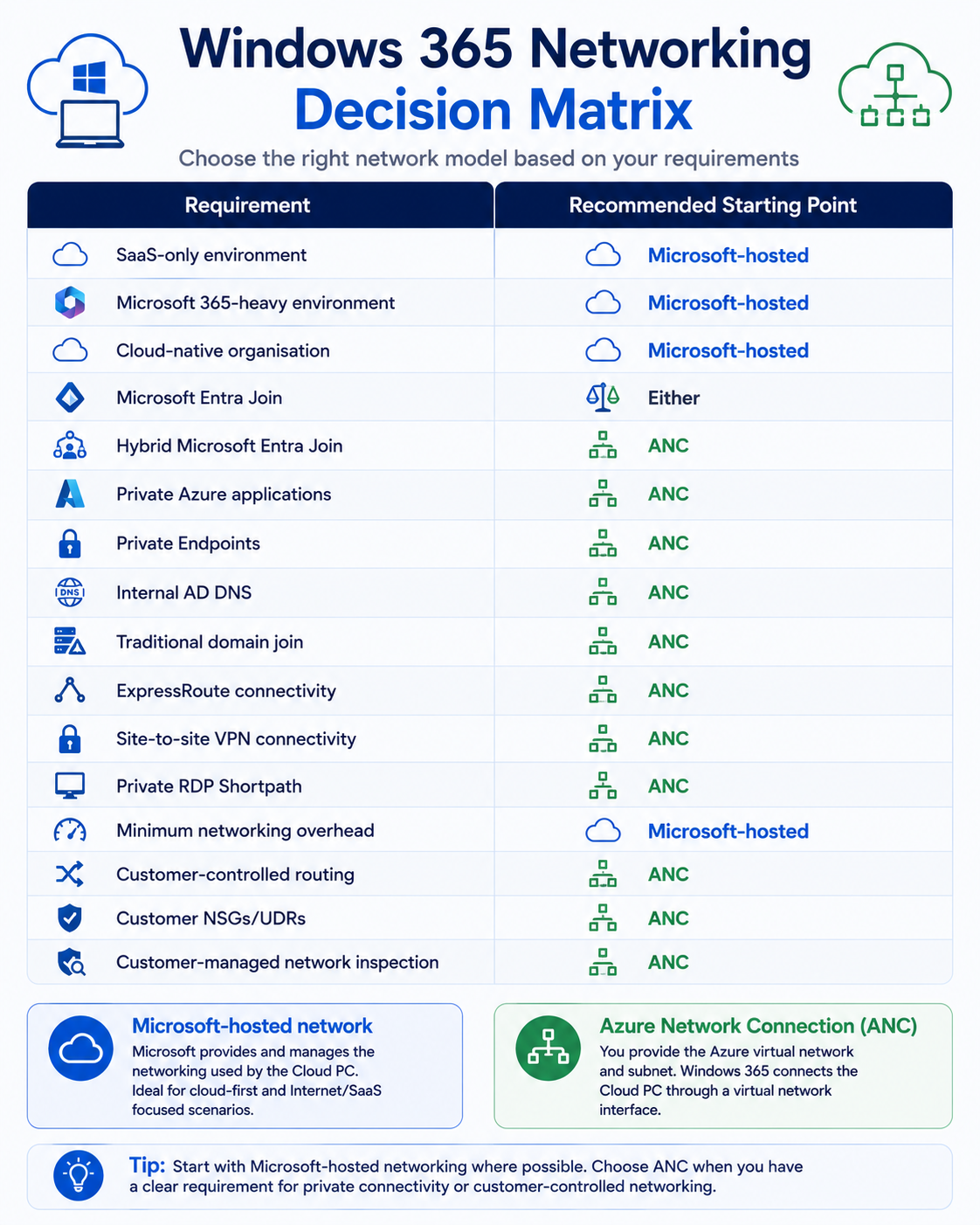
Decision Matrix
| Requirement | Recommended Starting Point |
|---|---|
| SaaS-only environment | Microsoft-hosted |
| Microsoft 365-heavy environment | Microsoft-hosted |
| Cloud-native organisation | Microsoft-hosted |
| Microsoft Entra Join | Either |
| Hybrid Microsoft Entra Join | ANC |
| Private Azure applications | ANC |
| Private Endpoints | ANC |
| Internal AD DNS | ANC |
| Traditional domain join | ANC |
| ExpressRoute connectivity | ANC |
| Site-to-site VPN connectivity | ANC |
| Private RDP Shortpath | ANC |
| Minimum networking overhead | Microsoft-hosted |
| Customer-controlled routing | ANC |
| Customer NSGs/UDRs | ANC |
| Customer-managed network inspection | ANC |
Fabs Recommended Design Principle
Start with:
Microsoft Entra Join + Microsoft-hosted network
Then ask:
What requirement forces us to introduce an Azure Network Connection?
If there isn't one, don't introduce the additional infrastructure.
If there is one, document it.
For example:
ANC required because Cloud PCs need private access to an Azure SQL Private Endpoint.
That's a strong architectural requirement.
ANC required because we've always had a corporate network.
Windows 365 Networking Checklist
Before finalising the architecture, confirm:
- Microsoft Entra Join or Hybrid Join?
- Is Hybrid Join genuinely required?
- Do Cloud PCs require private network connectivity?
- Microsoft-hosted network or ANC?
- Where are users located?
- Where are applications located?
- Where is application data located?
- Is customer-controlled DNS required?
- Can DNS resolve all private application namespaces?
- If Hybrid Join is used, can DNS resolve AD DS?
- Are at least two appropriate DNS servers available?
- Does the subnet have sufficient IP capacity?
- Are ANCs healthy?
- Would alternate ANCs improve provisioning resilience?
- Is regional placement unnecessarily constrained?
- Are Microsoft/AVD endpoints routed directly where appropriate?
- Is traffic being unnecessarily hairpinned through the datacentre?
- Are NSGs, UDRs, firewalls and NVAs documented?
- Is RDP Shortpath enabled?
- Can UDP be used from client networks?
- Is TURN available for public Shortpath fallback?
- Is RDP Multipath supported by the client estate?
- Are Windows 365 and AVD service endpoints excluded from inappropriate TLS inspection?
- Have both the client-to-Cloud-PC and Cloud-PC-to-application paths been tested?
- Is network monitoring in place?
Final Thoughts
Windows 365 networking doesn't have to be complicated.
For many organisations, the simplest architecture is also the best:
Microsoft Entra Join
↓
Microsoft-Hosted Network
↓
Cloud PC
↓
Microsoft 365 + SaaS
But enterprise requirements can justify a more sophisticated model:
Microsoft Entra Join / Hybrid Join
↓
Azure Network Connection
↓
Customer VNet
↓
DNS + Routing + Security
↓
Azure + On-Premises Private Resources
The important principle is not to introduce customer-managed networking simply because it feels familiar.
Every ANC introduces infrastructure that somebody must:
Design → Secure → Monitor → Troubleshoot → Scale → Maintain
Use it when it provides a genuine architectural benefit.
Otherwise, let Windows 365 abstract the network complexity it was designed to remove.
Microsoft Documentation
Windows 365 network requirements
Azure Network Connection overview
Create an Azure Network Connection
Create Windows 365 provisioning policies
Windows 365 identity and authentication
RDP Shortpath for private networks
RDP Shortpath for public networks
RDP Multipath with Windows 365
Next in the Windows 365 Series
Windows 365 Security Explained: Building a Zero Trust Cloud PC Architecture
This would naturally follow networking and bring together Conditional Access, SSO, MFA/passwordless authentication, Intune compliance, Defender for Endpoint, endpoint security, session controls, clipboard/device redirection, Cloud PC isolation and privileged administration into one enterprise Windows 365 security architecture.
Click Here To Return To Blog