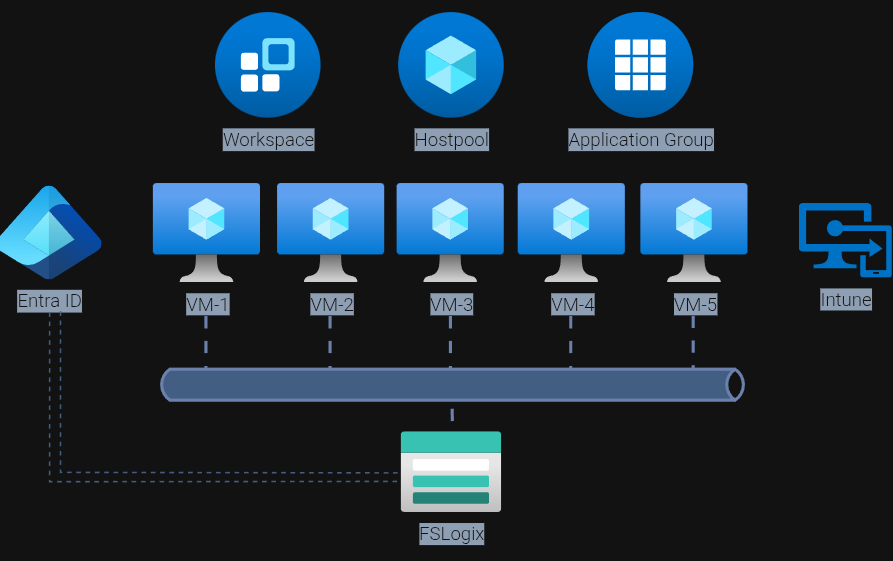
Microsoft Entra Kerberos for Azure Files is a major step forward for cloud-native Azure Virtual Desktop (AVD) design.
It enables organisations to run FSLogix profile containers on Azure Files using Entra-joined session hosts, without relying on traditional domain controllers or Microsoft Entra Domain Services for cloud-only identity scenarios. For AVD architects, this means a cleaner platform model: stateless session hosts, Entra-based identity, and Azure Files for profile persistence.
This guide walks through the architecture, prerequisites, configuration, and validation steps needed to deploy FSLogix on Azure Files using native Microsoft Entra Kerberos authentication.
Important: Cloud-only identity support for Azure Files with Entra Kerberos remains in preview, and Microsoft notes that support is currently limited in scope, including specific support for FSLogix scenarios in Azure Virtual Desktop.
Quick Implementation Checklist
Before you start, make sure the following are true:
- Azure Files is configured to use Microsoft Entra Kerberos as its identity source
- The storage account is not simultaneously configured for AD DS or Entra Domain Services
- Session hosts are Microsoft Entra joined or Microsoft Entra hybrid joined
- Session hosts run a supported OS build
- The Entra-generated storage account app registration exists and has required consent/configuration
- The CloudKerberosTicketRetrievalEnabled setting is enabled on AVD hosts
- Required Windows services are running on each session host
- Conditional Access or MFA does not block the storage account app path
- Share-level Azure RBAC is configured correctly
- File and folder-level ACLs are configured correctly
- FSLogix points to the correct Azure Files SMB path
- Kerberos ticket acquisition and manual SMB access are validated before testing FSLogix
Architecture Overview
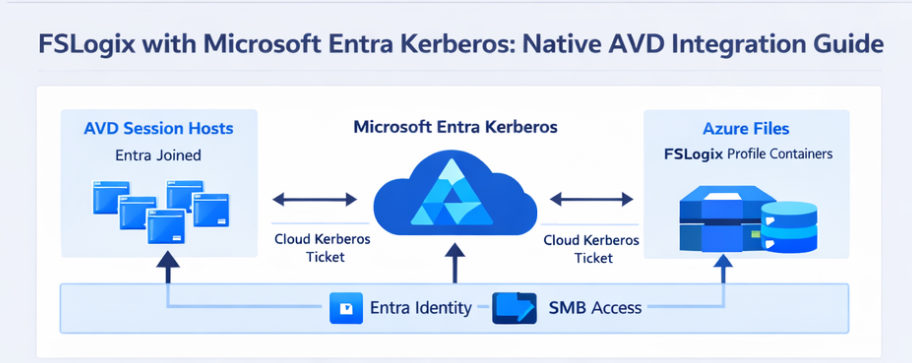
At a high level, the architecture looks like this:
- AVD session hosts are Microsoft Entra joined or Microsoft Entra hybrid joined
- FSLogix profile containers are stored on an Azure Files SMB share
- The storage account is configured for Microsoft Entra Kerberos authentication
- During sign-in, the session host retrieves a cloud Kerberos TGT and uses it to access Azure Files over SMB
Access control is split between:
- Azure RBAC at the share level
- ACLs at the directory and file level
The key architectural shift is simple but important: there is no dependency on a domain controller for the SMB authentication path in cloud-only identity scenarios. Instead, Entra issues the Kerberos tickets required to access the Azure Files endpoint.
Why This Matters for AVD
This pattern fits naturally into a modern AVD design:
- No domain controllers required for the cloud-only FSLogix access path
- Session hosts can be treated as rebuildable compute
- Identity is centralised in Microsoft Entra
- Profile persistence remains on Azure Files
- The security model becomes cleaner and more cloud-native
For organisations trying to reduce legacy dependencies in AVD, this is a very significant design improvement.
Prerequisites and Supportability
Before making any production changes, validate the following.
Identity Source for Azure Files
A storage account can only use one identity source for Azure Files at a time. If the account is already configured for AD DS or Entra Domain Services, that must be removed before enabling Microsoft Entra Kerberos.
Supported Operating Systems
For cloud-only identities, Microsoft currently requires one of the following:
- Windows 11 Enterprise/Pro single-session or multi-session
- Windows Server 2025 with the latest cumulative updates
For hybrid identities, Microsoft also supports current builds of:
- Windows 10 Enterprise/Pro, version 2004 or later with required updates
- Windows Server 2022 with the required updates
Microsoft also states that clients must be Microsoft Entra joined or Microsoft Entra hybrid joined. They cannot be joined only to AD, and they cannot use Entra Domain Services join for this flow.
Required Local Services
On each session host, confirm that at least the following services are running:
- WinHTTP Web Proxy Auto-Discovery Service
- IP Helper
These services support the Entra Kerberos ticket path and related connectivity requirements.
Conditional Access and MFA Considerations
Microsoft explicitly notes that MFA or interactive controls applied to the storage account app path can break Azure Files Kerberos access. The storage account’s Entra app registration must not be blocked by Conditional Access rules intended for interactive user sign-in.
Step 1: Enable Microsoft Entra Kerberos on the Storage Account
On the storage account that will hold FSLogix profile containers:
- Go to File shares
- Open Identity-based access
- Under Microsoft Entra Kerberos, enable the feature
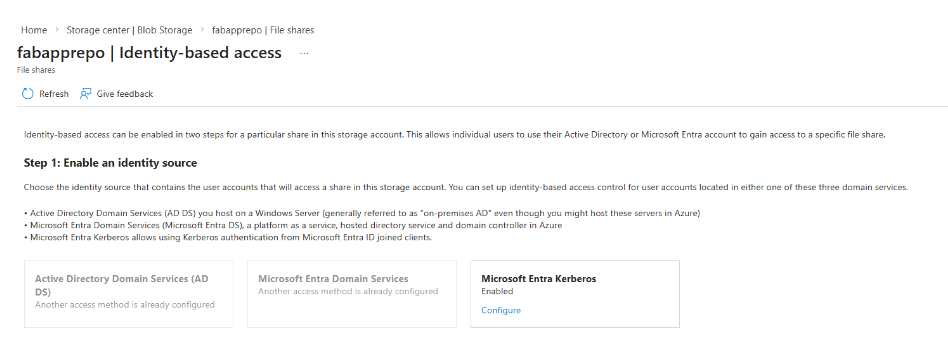
This can also be configured by PowerShell:
Set-AzStorageAccount `
  -ResourceGroupName "<rg-name>" `
  -Name "<storageaccountname>" `
  -EnableAzureActiveDirectoryKerberosForFile $true
Or by Azure CLI:
az storage account update \
  --name <storageaccountname> \
  --resource-group <rg-name> \
  --enable-files-aadkerb true
This changes the Azure Files SMB identity path to Microsoft Entra Kerberos.
Step 2: Validate the Entra App Registration
When you enable Entra Kerberos for Azure Files, Azure creates an Entra app registration for the storage account.
You should:
- Locate it in App registrations
- Confirm it exists with the expected storage account naming
- Validate required permissions and consent
- Avoid repurposing it for any other use
- Add following context to Manifest:
- “kdc_enable_cloud_group_sids”
** amending the Manifest is open to change when this feature goes GA
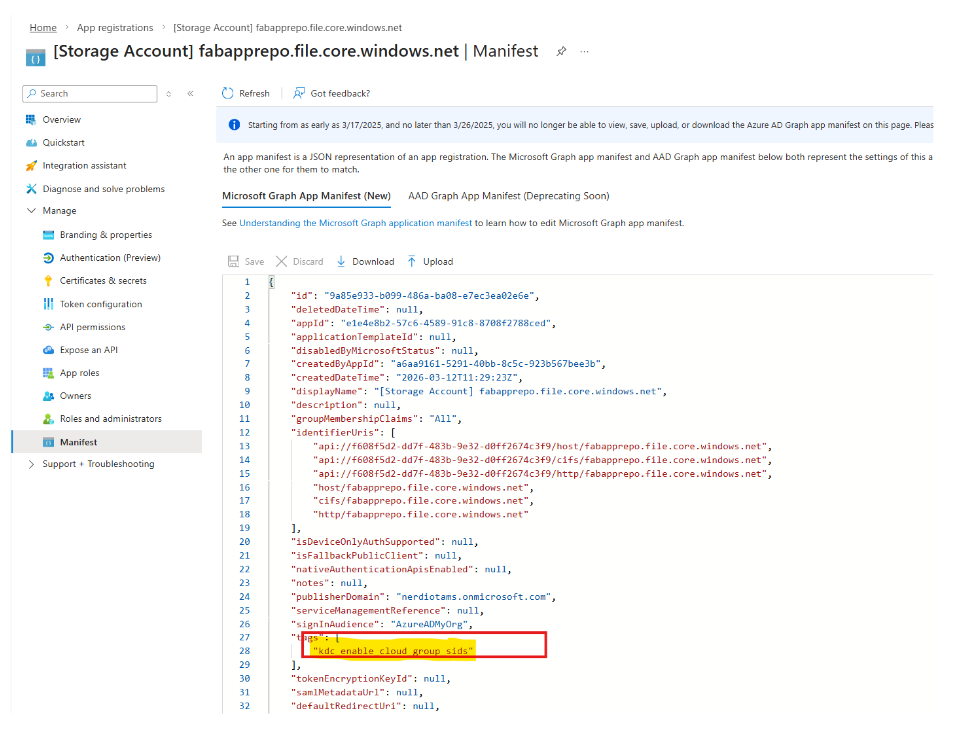
This app registration is part of the Kerberos flow for the Azure Files endpoint.
Step 3: Configure Share-Level Access with Azure RBAC
Azure RBAC controls access at the share boundary.
Typical role assignments include:
- Storage File Data SMB Share Contributor
- Storage File Data SMB Share Elevated Contributor
In preview cloud-only scenarios, Microsoft notes that support relies on default share-level permissions for authenticated identities, with downstream access isolation handled carefully at the next layer.
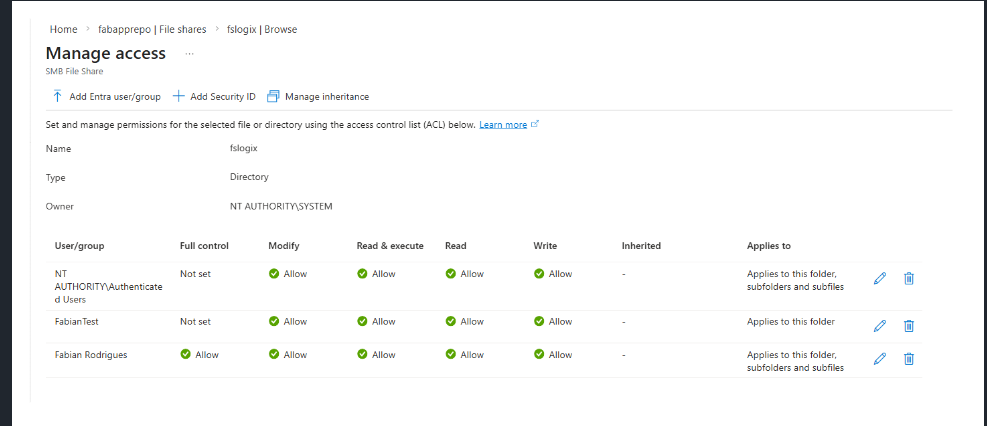
Step 4: Configure Permissions on the Storage Account & File Share
Azure RBAC on File Share & SMB File Share
File Share:
- Storage File Data Privleged Conributor
- Storage File Data SMB Share Elevated Contributor
SMB File Share:
- Storage File Data SMB Share Contributor
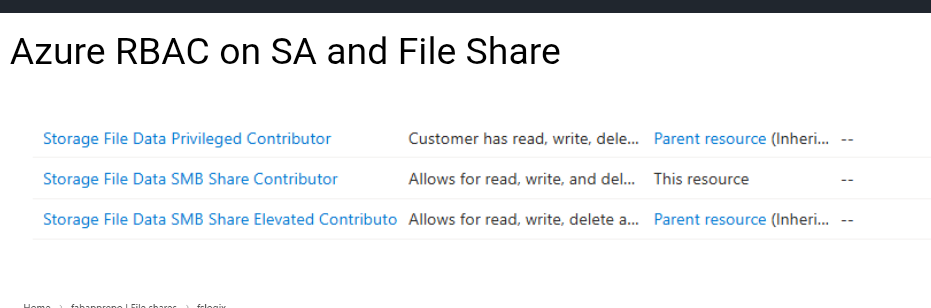
** Permissions is open to change when this feature goes GA
Until this goes GA need to now navigate to this URL:
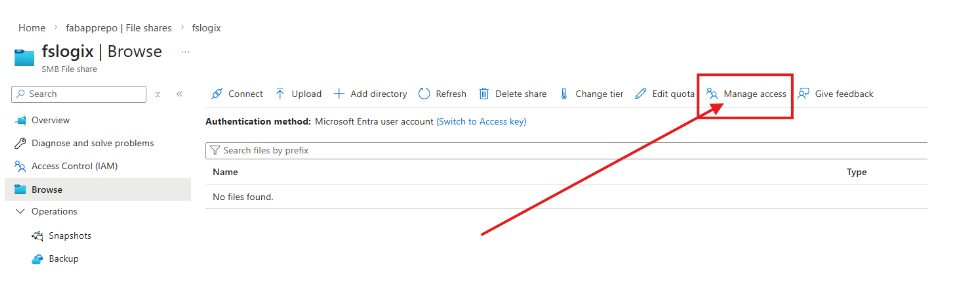
From here, when you “Browse" on the SMB File Share you will see the “Manage Access”
From here you assign permissions for end users:
Step 5: Enable Cloud Kerberos TGT Retrieval on AVD Session Hosts
This is one of the most important steps.
By default, Entra-joined devices do not automatically retrieve the cloud Kerberos TGT needed for Azure Files SMB access. You must enable the setting on each AVD host.
Recommended: Intune Settings Catalog
Microsoft now recommends using Settings Catalog to configure:
- Kerberos / CloudKerberosTicketRetrievalEnabled = Enabled
This is especially important for AVD multi-session, where Microsoft explicitly notes that Settings Catalog should be used instead of a custom OMA-URI approach.
Group Policy Option
For hybrid-joined scenarios, you can also enable the Group Policy:
Computer Configuration > Administrative Templates > System > Kerberos > Allow retrieving the Azure AD Kerberos Ticket Granting Ticket during logon
Registry Option
As a fallback or for troubleshooting:
reg add HKLM\SYSTEM\CurrentControlSet\Control\Lsa\Kerberos\Parameters ^
  /v CloudKerberosTicketRetrievalEnabled /t REG_DWORD /d 1 /f
Once enabled, the host will prefer the Entra Kerberos realm for Entra-enabled storage accounts.
Step 6: Plan for Co-Existence with AD DS–Backed Storage
Some organisations still need a transition state where hosts access:
- Azure Files using Microsoft Entra Kerberos
- Other SMB shares using AD DS-backed Kerberos
In that case, host-to-realm mappings may be required so the client knows which Kerberos realm to use for which endpoint.
Example:
ksetup /addkdc CONTOSO.LOCAL dc01.contoso.local
ksetup /addhosttorealmmap <storageaccount>.file.core.windows.net CONTOSO.LOCAL
This is only needed in mixed environments. If you are fully Entra-only, you can usually skip it.
Step 7: Validate Kerberos and SMB
Before you test FSLogix, validate the authentication path itself.
On a session host, log in as a target user and run:
klistnet use
You should confirm:
- A cloud Kerberos TGT exists
- A service ticket exists for:
cifs/<storageaccount>.file.core.windows.net
- The SMB share can be mounted successfully
If not, check:
- Join state
- Intune or GPO application
- Registry value presence
- Network access to Entra and Azure Files
- Conditional Access exclusions for the storage account app
How This Fits into a Modern AVD Design
This pattern is one of the clearest examples of where AVD architecture is heading:
- Entra-only or hybrid identity
- No domain controller dependency for the cloud-only Azure Files authentication path
- Session hosts treated as cattle, not pets
- Profiles isolated cleanly on Azure Files
- A smaller attack surface and simpler network model
This is not just a configuration change. It is a meaningful architectural shift toward a more maintainable, cloud-native AVD platform.
Final Thoughts
Microsoft Entra Kerberos for Azure Files finally gives AVD architects a cleaner way to combine:
- Microsoft Entra
- Azure Files
- FSLogix
- Stateless session hosts
For teams trying to modernise beyond legacy AD-backed storage dependencies, this is a very important capability — even if parts of the cloud-only story are still in preview and need careful testing before broad rollout.
** Above mentioned steps open to change when this feature goes GA
Recommended Microsoft References
- Microsoft Entra Kerberos overview
- Enable Microsoft Entra Kerberos authentication for Azure Files
- Configure Windows AVDs by using the Azure Portal
- Store FSLogix profile containers on Azure Files using Microsoft Entra ID
Click Here To Return To Blog