Introduction
Azure Virtual Desktop and Windows 365 have transformed how organisations deliver secure desktop experiences to users around the world. However, as organisations continue adopting cloud-native services, protecting remote access has become increasingly important.
Traditional VPN solutions were designed for an era when applications lived inside corporate networks. Today's modern workplace requires a different approach—one that continuously verifies users, devices and applications before granting access.
Microsoft Global Secure Access (GSA) extends Microsoft's Zero Trust strategy by providing identity-aware connectivity that integrates directly with Microsoft Entra, Microsoft Intune and Conditional Access.
For organisations already running Azure Virtual Desktop or Windows 365, Global Secure Access adds another important layer of security without fundamentally changing how users connect to their desktops.
Why Azure Virtual Desktop Doesn't Need a Traditional VPN
One of the biggest misconceptions is that Azure Virtual Desktop requires a VPN.
It doesn't.
Microsoft designed Azure Virtual Desktop so that:
- Reverse Connect removes the requirement for inbound RDP ports.
- Session hosts establish outbound connections to the Azure Virtual Desktop service.
- Users authenticate through Microsoft Entra.
- RDP traffic is brokered securely via Microsoft's control plane.
This architecture already provides a significantly more secure connectivity model than exposing Remote Desktop Services directly to the internet.
However...
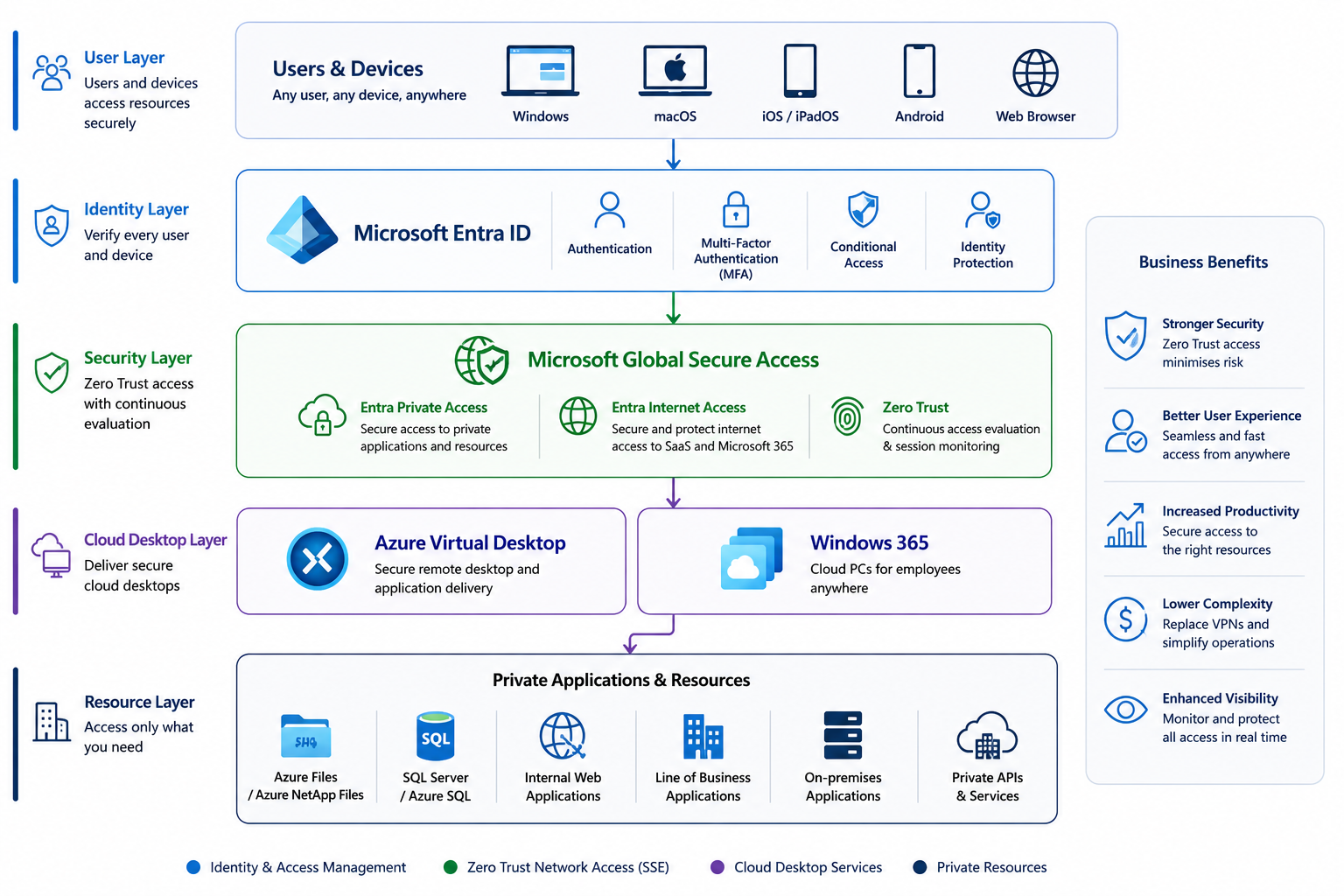
Users still need secure access to:
- Internal web applications
- Azure Files
- File servers
- SQL Servers
- Line-of-business applications
- Private APIs
This is where Global Secure Access becomes valuable.
How Global Secure Access Complements AVD
Rather than replacing Azure Virtual Desktop, GSA complements it.
It provides secure access to resources that your AVD session hosts or users depend upon.
Examples include:
- Azure Files
- Azure NetApp Files
- Internal websites
- On-premises applications
- SQL databases
- Management portals
Instead of publishing these resources through VPNs, organisations can use Microsoft Entra Private Access to publish applications securely using Zero Trust principles.
Typical Architecture
Key Benefits for Azure Virtual Desktop
Identity-Based Security
Access decisions are evaluated using:
- User identity
- Device compliance
- Risk score
- Location
- Authentication strength
- Session risk
This aligns perfectly with Microsoft's Zero Trust framework.
Improved User Experience
Traditional VPNs often require:
- Manual connection
- Separate credentials
- Additional software
- User intervention
With Global Secure Access:
- Users sign in once.
- Authentication is transparent.
- Access policies are automatically enforced.
For remote workers this creates a much smoother experience.
Stronger Conditional Access Integration
One of Microsoft's biggest advantages is the native integration with Conditional Access.
Examples include:
Require:
- MFA
- Compliant devices
- Hybrid joined devices
- Low user risk
- Low sign-in risk
- Approved countries
- Authentication strength
These policies apply consistently across:
- Azure Virtual Desktop
- Windows 365
- Microsoft 365
- Azure Portal
- Private applications
Windows App + Global Secure Access
The Windows App is Microsoft's recommended client for Azure Virtual Desktop and Windows 365.
When combined with Global Secure Access, organisations can deliver:
- Secure authentication
- Conditional Access enforcement
- Identity-aware connectivity
- Continuous session evaluation
- Improved sign-in experience
Users simply launch Windows App and access their assigned desktops while security policies are enforced behind the scenes.
Protecting Azure Files
Many Azure Virtual Desktop environments use:
- Azure Files
- Azure NetApp Files
for FSLogix profile containers.
Although Global Secure Access doesn't replace SMB connectivity, it can help protect access to supporting management interfaces and private applications associated with your desktop environment.
Combined with:
- Private Endpoints
- Microsoft Entra Kerberos
- Conditional Access
organisations can significantly reduce their attack surface.
Windows 365 Benefits
Windows 365 users benefit in much the same way.
Global Secure Access provides:
- Identity-first access
- Conditional Access enforcement
- Secure application connectivity
- Consistent security posture
- Better user experience
Cloud PCs become another endpoint protected by Microsoft's Zero Trust architecture.
Security Layers Working Together
Rather than relying on a single technology, organisations should think in terms of layered security.
| Layer | Technology |
|---|---|
| Identity | Microsoft Entra ID |
| Authentication | MFA / Passwordless |
| Device | Microsoft Intune |
| Access Policies | Conditional Access |
| Secure Connectivity | Global Secure Access |
| Desktop Platform | Azure Virtual Desktop / Windows 365 |
| Endpoint Protection | Microsoft Defender |
| Monitoring | Microsoft Sentinel |
Each technology complements the others.
Deployment Best Practices
For Azure Virtual Desktop environments, Microsoft recommends:
✔ Enable MFA.
✔ Deploy Conditional Access policies.
✔ Use compliant devices.
✔ Deploy the Global Secure Access client to managed devices.
✔ Use Microsoft Entra Private Access for internal applications.
✔ Use Private Endpoints wherever possible.
✔ Secure Azure Files using Microsoft Entra Kerberos.
✔ Monitor sign-ins using Microsoft Entra and Microsoft Sentinel.
Common Scenarios
Hybrid Workforce
Users connect securely from:
- Home
- Office
- Customer sites
- Public Wi-Fi
without relying on legacy VPN infrastructure.
Contractors
Provide access to:
- Azure Virtual Desktop
- Internal applications
- File services
without exposing your internal network.
Global Organisations
Global Secure Access uses Microsoft's worldwide network to optimise connectivity while enforcing consistent security policies regardless of user location.
Current Considerations
Before deployment, review:
- Licensing requirements.
- Supported operating systems.
- Private Access connector placement.
- Application compatibility.
- Network topology.
- Existing VPN coexistence.
A phased rollout alongside existing VPN infrastructure is often the most effective approach.
Conclusion
Azure Virtual Desktop and Windows 365 already provide secure remote desktop experiences through Microsoft's cloud-native architecture. Microsoft Global Secure Access builds on that foundation by introducing identity-first connectivity, continuous access evaluation and native integration with Microsoft Entra, Intune and Conditional Access.
Rather than replacing your desktop platform, GSA strengthens it—helping organisations move away from traditional VPNs and towards a modern Zero Trust security model.
For organisations already invested in Microsoft's cloud ecosystem, Global Secure Access represents a natural evolution in securing both users and applications while simplifying remote access.
Microsoft Documentation
I recommend linking to:
Coming Next
Part 3 explores how Microsoft Global Secure Access fits into environments managed with Nerdio Manager for Enterprise, including deployment considerations, operational best practices, integration opportunities, and design guidance for enterprise Azure Virtual Desktop environments.
Click Here To Return To Blog