A Simpler Way to Synchronise Devices to Microsoft Entra ID for Azure Virtual Desktop & Windows 365
As organisations continue modernising identity services, Microsoft is steadily reducing the dependency on traditional Active Directory synchronisation.
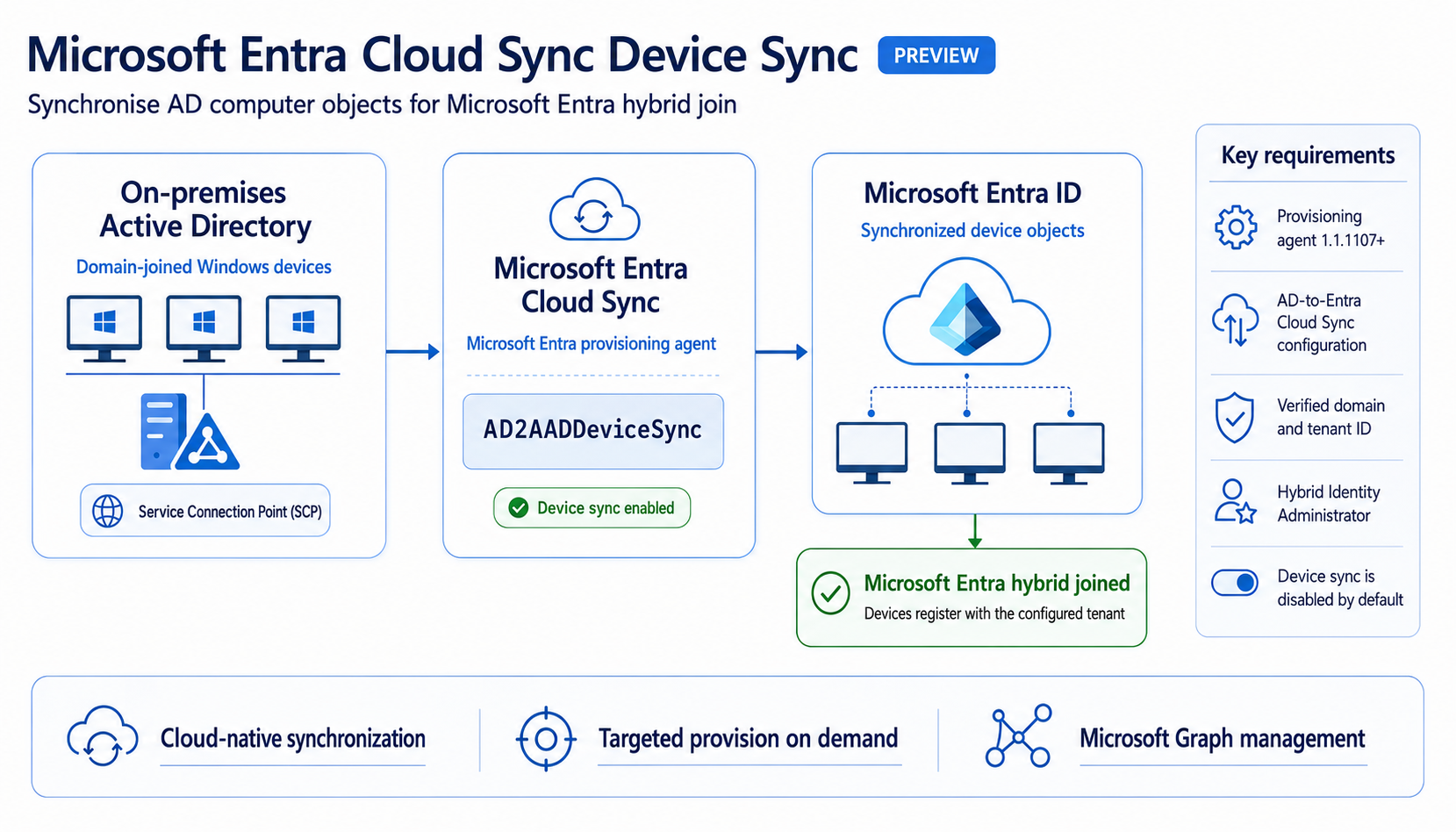
One of the latest additions is Device Synchronization for Microsoft Entra Cloud Sync, allowing supported device objects to synchronise to Microsoft Entra ID without requiring Microsoft Entra Connect Sync.
For organisations planning Azure Virtual Desktop (AVD), Windows 365, Intune, and Microsoft Entra modernisation projects, this capability provides another step towards a cloud-first identity architecture.
In this article, we'll explain what Device Synchronization is, how it works, its current limitations, and where it fits into modern Azure Virtual Desktop deployments.
---
What is Microsoft Entra Cloud Sync Device Synchronization?
Device sync lets you synchronize computer objects from Active Directory (AD) to Microsoft Entra ID by using the AD2AADDeviceSync job in an AD to Microsoft Entra ID Cloud Sync configuration.
After synchronization, the devices can become Microsoft Entra hybrid joined.
---
Why is Microsoft Introducing Device Sync?
Microsoft is continuing its transition towards:
- Cloud-first identity
- Simpler deployment
- Reduced infrastructure management
- Better scalability
- High availability
Compared to Entra Connect Sync, Cloud Sync offers:
- Lightweight provisioning agents
- Easier deployment
- Multiple active agents
- Improved resilience
- Reduced server dependency
Adding device synchronisation closes one of the biggest functional gaps that previously required organisations to continue using Entra Connect Sync.
---
How Device Synchronization Works
At a high level:
Active Directory
│
▼
Microsoft Entra Cloud Provisioning Agent
│
▼
Microsoft Entra Cloud Sync
│
▼
Microsoft Entra ID
│
▼
Azure Virtual Desktop
Windows 365
Microsoft Intune
Microsoft 365
Instead of a full synchronisation engine running on a dedicated server, lightweight provisioning agents securely communicate with Microsoft Entra.
---
How to Enable Device Sync
MS KB: https://learn.microsoft.com/en-us/entra/identity/hybrid/cloud-sync/device-sync#enable-device-sync
Benefits for Azure Virtual Desktop
For Azure Virtual Desktop environments, this offers several advantages.
Simplified Identity Infrastructure
Organisations can reduce reliance on traditional synchronisation servers while continuing to synchronise supported device objects.
---
Improved High Availability
Cloud Sync supports multiple active provisioning agents.
If one server becomes unavailable, another agent can continue processing synchronisation requests.
---
Easier Deployment
Compared to Entra Connect Sync, Cloud Sync requires:
- Less infrastructure
- Simpler maintenance
- Faster deployment
---
Better Alignment with Cloud-First AVD
Many new Azure Virtual Desktop deployments are moving towards:
- Microsoft Entra Join
- Intune management
- Cloud Kerberos
- Azure Files
- Passwordless authentication
Device Synchronization complements this direction by modernising the synchronisation layer.
---
Where This Helps Windows 365
Windows 365 customers can also benefit from:
- Simpler hybrid identity
- Easier device lifecycle management
- Improved provisioning resilience
- Reduced synchronisation infrastructure
---
Current Considerations
Before replacing Microsoft Entra Connect Sync, administrators should understand that Device Synchronization is designed for supported scenarios.
Microsoft documents the supported capabilities, prerequisites, and current limitations in the official documentation.
As with any identity platform change, validate compatibility before migrating production environments.
---
Azure Virtual Desktop Design Considerations
For AVD environments, consider using Device Synchronization when designing:
- New hybrid identity deployments
- Cloud-first landing zones
- Intune-managed session hosts
- Microsoft Entra joined Windows 11 multi-session
- Windows 365 Cloud PCs
Review existing synchronisation requirements before transitioning from Entra Connect Sync.
---
FABS Solutions Best Practices
Before implementing Device Synchronization:
✅ Review your existing Entra Connect Sync configuration
✅ Understand supported synchronisation scenarios
✅ Validate Azure Virtual Desktop identity requirements
✅ Test synchronisation in a pilot environment
✅ Monitor synchronisation health after deployment
---
How This Fits into a Modern AVD Architecture
A modern Azure Virtual Desktop identity stack increasingly looks like this:
- Microsoft Entra ID
- Microsoft Entra Cloud Sync
- Microsoft Intune
- Microsoft Entra Kerberos
- Azure Files
- FSLogix
- Conditional Access
- Microsoft Entra PIM
- Windows App
Together these services create a simpler, cloud-native identity platform with fewer traditional Active Directory dependencies.
---
Final Thoughts
Microsoft Entra Cloud Sync Device Synchronization represents another important step towards simplifying hybrid identity.
While it won't replace every Microsoft Entra Connect Sync deployment overnight, it significantly expands what organisations can achieve using Cloud Sync.
For Azure Virtual Desktop and Windows 365 administrators planning modern identity architectures, this is a feature worth understanding and evaluating as part of future migration projects.
As Microsoft continues investing in cloud-native identity, we expect Cloud Sync to become the preferred synchronisation model for many new Azure Virtual Desktop deployments.
---
References
Microsoft Learn: Microsoft Entra Cloud Sync – Device Synchronization
Click Here To Return To Blog