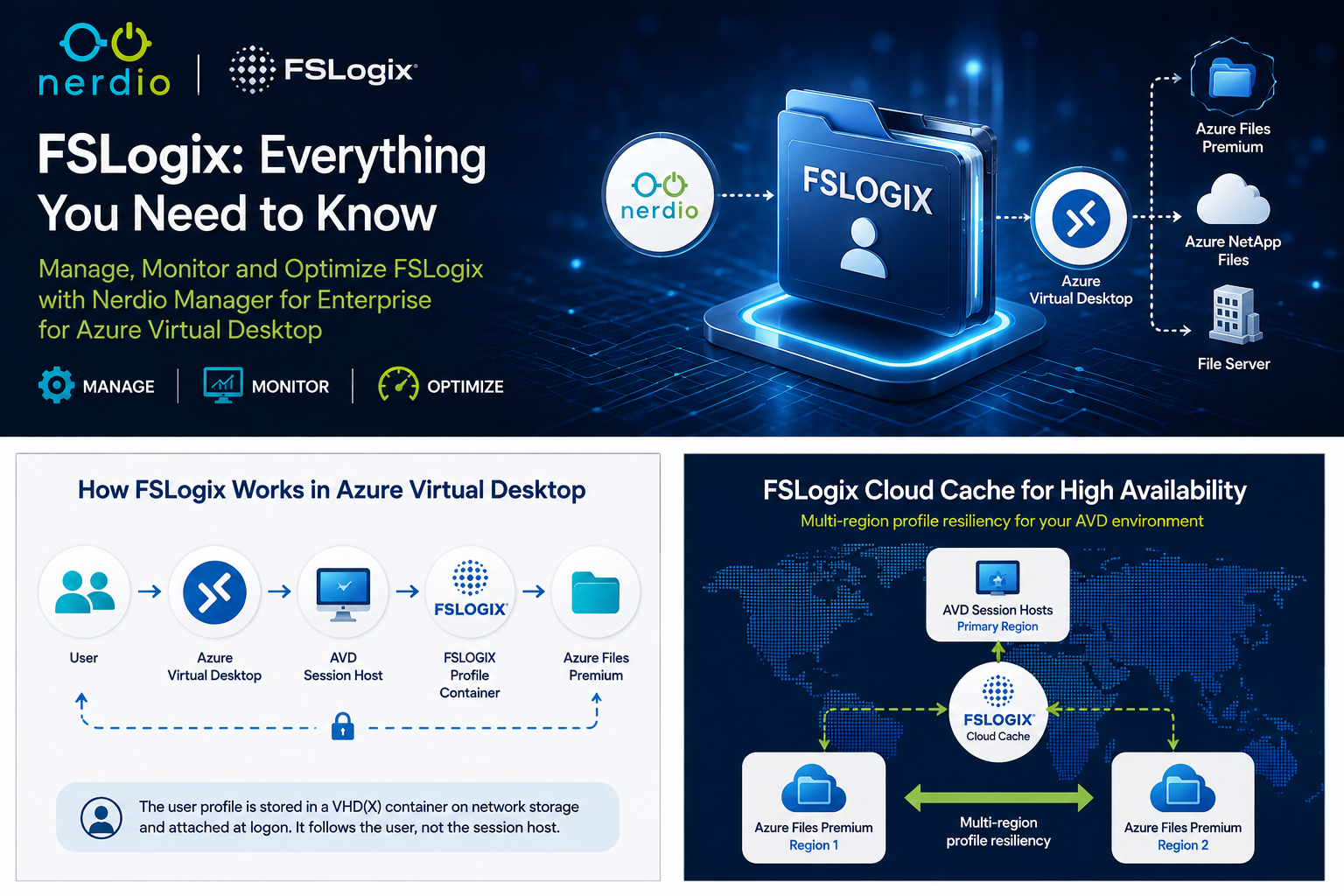
FSLogix remains one of the most important components in a successful Azure Virtual Desktop deployment.
In pooled AVD environments, users may connect to different session hosts each time they sign in. FSLogix solves this problem by storing the user profile inside a VHD or VHDX container that is attached to the session host during logon.
This provides users with a consistent profile while allowing the underlying AVD session hosts to remain relatively disposable.
However, a reliable FSLogix deployment requires more than simply configuring a profile path.
A successful design must consider:
Storage → Identity → Permissions → Performance → Resiliency → Monitoring → Profile Lifecycle
Nerdio Manager for Enterprise helps bring these elements together by providing centralised configuration, profile management, monitoring and automation for FSLogix across Azure Virtual Desktop.
In this article, I will summarise the key points from Nerdio's FSLogix: Everything You Need To Know session and add some practical design recommendations for managing FSLogix in production.
🎥 Nerdio Video – FSLogix: Everything You Need To Know
The Nerdio session provides a useful overview of FSLogix profile management and the operational considerations administrators should understand when designing an AVD environment.
A key takeaway is that FSLogix should not be treated as an isolated Windows configuration.
It is part of the wider AVD architecture.
Managing FSLogix with Nerdio
Without a management platform, FSLogix configuration can involve a combination of:
- Group Policy
- Registry configuration
- PowerShell
- Storage configuration
- NTFS permissions
- Azure RBAC
- FSLogix installation and upgrades
Nerdio Manager simplifies this by allowing administrators to create FSLogix configurations centrally and associate them with AVD host pools.
Nerdio can also install FSLogix automatically when session hosts are created or re-imaged.
Configuration options can include:
- FSLogix version
- Profile storage location
- Profile Container settings
- ODFC Container settings
- Cloud Cache
- Logging
- Application Services
- Registry configuration
Nerdio also supports per-host-pool FSLogix configuration, which is particularly useful when different workloads require different profile architectures.
💡 Fabs Field Recommendation
Avoid creating unique FSLogix settings for every host pool unless there is a genuine requirement.
Create a small number of standard configurations such as Production, Development/Test and DR/Cloud Cache. Standardisation makes operations and troubleshooting significantly easier.
Choosing the Right FSLogix Storage
Storage is one of the most important FSLogix design decisions.
Poor profile-storage performance can directly affect:
- Logon times
- Application responsiveness
- Outlook performance
- Profile mounting
- User experience
For most new AVD deployments, Azure Files Premium is a strong starting point.
Other options include:
Azure NetApp Files
Useful for environments with demanding performance requirements, very large deployments or existing NetApp architectures.
Traditional File Servers
Supported, but administrators remain responsible for maintaining the Windows servers, storage, patching, availability and disaster recovery.
FSLogix Cloud Cache
Cloud Cache allows multiple profile storage locations to be configured and can provide additional resilience.
💡 Fabs Field Recommendation
Don't size FSLogix storage based only on total profile capacity.
Consider:
IOPS + throughput + latency + concurrent logons + profile growth
A storage platform may have plenty of free capacity while still delivering poor FSLogix performance during morning logon storms.
FSLogix Cloud Cache
Cloud Cache is powerful, but it should not automatically be enabled in every environment.
A simple example could be:
AVD Session Host
↓
FSLogix Cloud Cache
↙ ↘
Azure Files – UK South Azure Files – UK West
This can provide additional profile resilience across storage locations or Azure regions.
However, Cloud Cache also increases architectural complexity and places additional importance on local session-host storage.
Nerdio's guidance recommends suitable high-performance local storage when Cloud Cache is used.
💡 Fabs Field Recommendation
Use Cloud Cache when there is a clear resiliency or multi-region requirement.
Do not deploy Cloud Cache simply because it sounds more highly available.
Complexity should solve a business or technical requirement.
Avoid Conflicting FSLogix Configuration
A common troubleshooting problem appears when several platforms configure FSLogix simultaneously.
For example:
Nerdio
Group Policy
Intune
Registry settings embedded in the image
This creates multiple sources of configuration authority.
💡 Fabs Field Recommendation
Decide which platform owns your FSLogix configuration.
If Nerdio is managing FSLogix, avoid unnecessarily configuring the same settings through GPO, Intune and the base image.
One configuration authority is considerably easier to troubleshoot than four.
Managing FSLogix Profiles with Nerdio
Another valuable Nerdio capability is direct profile management.
Traditionally, administrators troubleshooting a profile might need to manually:
- Find the correct storage account.
- Locate the profile share.
- Determine the user's SID.
- Find the VHDX.
- Check whether it is locked.
- Rename, archive or delete it.
Nerdio simplifies this through its FSLogix Profile Management functionality.
Administrators can search for profiles and perform operations such as:
- Archive
- Restore
- Delete
- Advanced profile searches
This can be extremely useful in environments containing thousands of profiles.
However, deleting a profile should not be the default troubleshooting response.
💡 Fabs Field Recommendation
Profile deletion is remediation — not diagnosis.
If multiple users repeatedly require profile resets, investigate the underlying storage, permissions, FSLogix configuration, identity or image problem.
Monitoring FSLogix with Nerdio Insights
Nerdio AVD Insights also provides useful visibility into FSLogix profile data.
Administrators can identify areas such as:
- Large profiles
- Profiles by last logon
- Multiple profiles for the same user
- Archived profiles
- Orphaned profiles
- File-share utilisation
This information can be turned into operational processes.
For example:
Profiles unused for 90+ days
↓
Review against user lifecycle
↓
Archive
↓
Retention period
↓
Delete when approved
Or:
Rapid profile-storage growth
↓
Identify largest profiles
↓
Investigate
↓
Clean unnecessary data
↓
Shrink containers
↓
Reclaim capacity
This is where FSLogix moves from being simply infrastructure to becoming an actively managed service.
FSLogix Identity Roaming
Administrators should also review older FSLogix settings carefully.
One example is RoamIdentity, which historically allowed credentials and Web Account Manager tokens to roam with a user's profile.
Current guidance does not recommend blindly enabling identity roaming, particularly in modern Microsoft Entra joined or Intune-managed AVD environments.
⚠️ Fabs Field Recommendation
Avoid copying historic FSLogix registry configurations into modern AVD images without reviewing them.
Settings originally introduced to solve authentication issues several years ago may no longer be appropriate with modern Entra ID, WAM and Microsoft 365 authentication.
Final Thoughts
FSLogix is fundamental to the user experience in most pooled Azure Virtual Desktop environments.
But successful profile management involves much more than setting a profile location.
Administrators need to consider:
Storage
Identity
Permissions
Performance
Configuration
Resiliency
Monitoring
Lifecycle management
Nerdio Manager for Enterprise provides a valuable management layer across these areas, allowing administrators to centralise FSLogix configuration, manage profiles, monitor storage usage, automate profile optimisation and integrate FSLogix with wider AVD operations.
My main recommendation is simple:
Don't treat FSLogix as a one-time configuration task. Treat it as a service that must be designed, monitored, maintained and optimised throughout the lifecycle of your Azure Virtual Desktop environment.
📚 Nerdio FSLogix Reference Library
FSLogix and User Profile Management
https://nmehelp.getnerdio.com/hc/en-us/articles/26126637566477-FSLogix-and-User-Profile-Management
FSLogix Settings and Configuration
https://nmehelp.getnerdio.com/hc/en-us/articles/25499417371661-FSLogix-settings-and-configuration
FSLogix Per-Host Pool Customization
https://nmehelp.getnerdio.com/hc/en-us/articles/26124330262925-FSLogix-per-host-pool-customization
Which FSLogix Profile Storage Option Should I Choose?
https://nmehelp.getnerdio.com/hc/en-us/articles/44790523136269-Which-FSLogix-Profile-storage-option-should-I-choose
Create and Manage Configured Azure Files Shares
https://nmehelp.getnerdio.com/hc/en-us/articles/25499406288653-Create-and-manage-configured-Azure-Files-shares
FSLogix Profile Management – Advanced Search
https://nmehelp.getnerdio.com/hc/en-us/articles/26124343876621-FSLogix-Profile-Management-Advanced-Search
FSLogix Shrink VHD/VHDX Containers
https://nmehelp.getnerdio.com/hc/en-us/articles/26124304008845-FSLogix-Shrink-VHD-VHDX-Containers-Scripted-Action
FSLogix Identity Roaming for Credentials and Tokens
https://nmehelp.getnerdio.com/hc/en-us/articles/26124371716109-FSLogix-Identity-Roaming-for-Credentials-and-Tokens
Insights: Azure Virtual Desktop
https://nmehelp.getnerdio.com/hc/en-us/articles/35702684120589-Insights-Azure-Virtual-Desktop
Host Pool Disaster Recovery
https://nmehelp.getnerdio.com/hc/en-us/articles/26124319021837-Host-Pool-Disaster-Recovery
Disclaimer: Product functionality changes regularly. Always review the latest Nerdio and Microsoft documentation before implementing production changes.
Click Here To Return To Blog