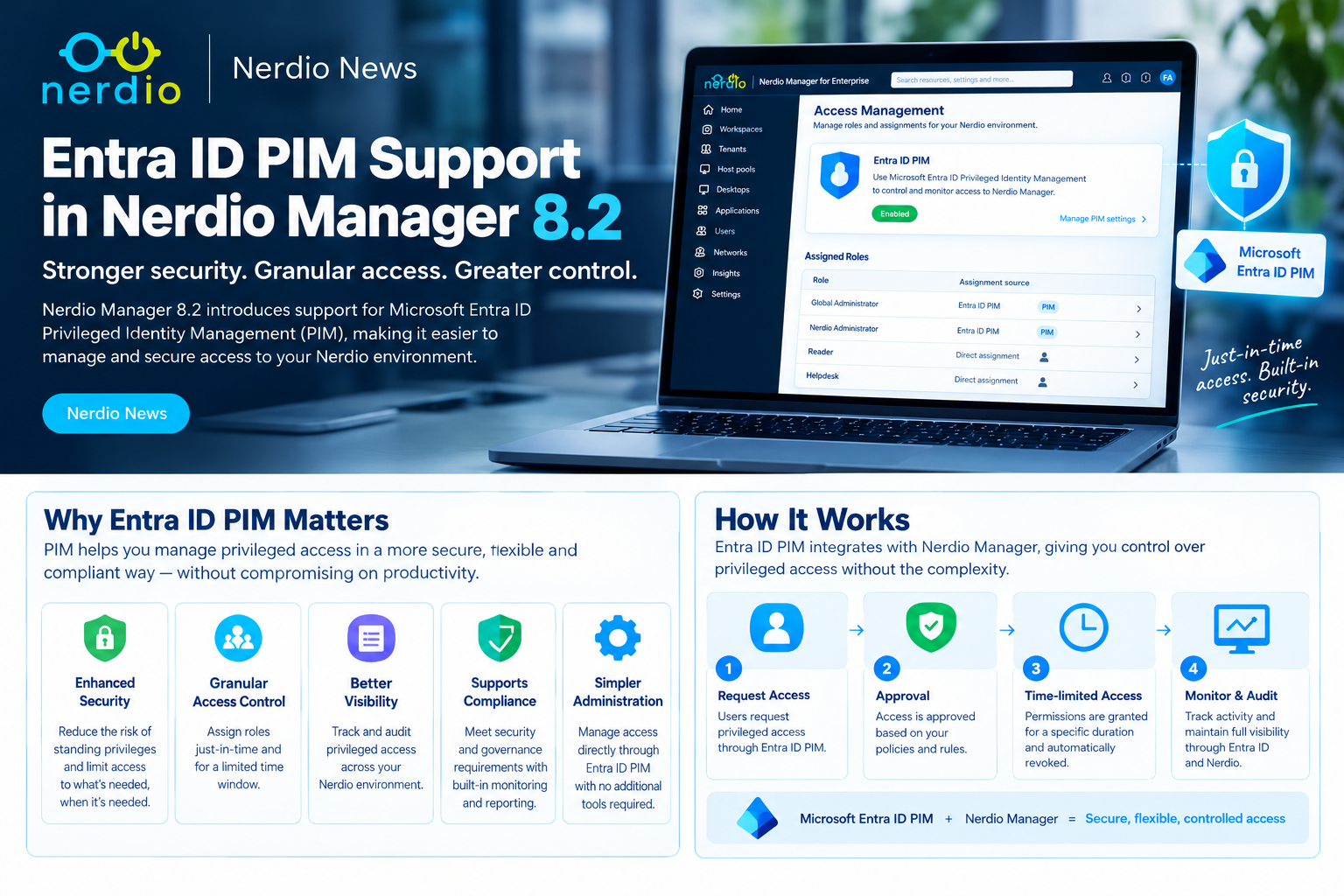
Nerdio Manager for Enterprise 8.2 introduces a significant security enhancement: native support for Microsoft Entra Privileged Identity Management (PIM) for Nerdio Manager roles.
For organisations managing Azure Virtual Desktop (AVD), Windows 365 and Microsoft Intune through Nerdio, this provides a more controlled way to manage privileged administrative access.
Instead of permanently assigning elevated Nerdio permissions, administrators can become eligible for privileged access and activate it only when required.
This is an important step towards a more secure, Zero Trust-aligned Windows Cloud operating model.
From Azure PIM to Nerdio PIM
In December 2025, I published an article exploring how Microsoft Entra PIM, Azure RBAC and Nerdio Manager could work together to secure AVD administration.
Related reading: Azure Virtual Desktop + Nerdio + Entra PIM: Secure by Design
That article focused primarily on using PIM to control privileged Azure infrastructure access while Nerdio provided the operational management layer.
With Nerdio Manager 8.2, the model evolves. Administrators can now use PIM-enabled Microsoft Entra security groups to control access to Nerdio Manager roles themselves.
This is an important distinction. Previously, an administrator might have time-limited Azure permissions but retain permanent elevated permissions within Nerdio Manager.
Now both access layers can be governed through privileged access processes.
Lets Recap what is Entra ID PIM
What's New in Nerdio Manager 8.2?
The new integration introduces several important capabilities.
- PIM-enabled group assignments: Nerdio Manager roles can be assigned through Microsoft Entra security groups managed by PIM for Groups.
- Just-in-time activation: Eligible administrators activate group membership when privileged access is required.
- Approval and justification: Organisations can apply PIM policies requiring approval, MFA and business justification.
- Time-limited access: Privileged group membership expires according to the configured activation duration.
- My Privileged Access: Nerdio provides an in-product page where administrators can view and activate eligible access.
- Stronger RBAC enforcement: Selected Nerdio roles can be configured to require PIM-backed groups.
The result is a more consistent approach to privileged access across Microsoft Entra and Nerdio Manager.
How Does It Work?
Consider an AVD engineer who occasionally needs to modify production host pools, desktop images or application deployment configurations.
Rather than granting permanent elevated Nerdio access, the organisation creates a PIM-enabled Entra security group associated with the appropriate Nerdio role.
The workflow becomes:
1. Administrator requires elevated access - The engineer needs to perform an approved production change.
2. Activate eligible access - From Nerdio's My Privileged Access page, the administrator requests activation of their eligible group membership.
3. PIM policy enforcement - Depending on the configured policy, activation may require MFA, justification and approval.
4. Temporary Nerdio permissions - Once group membership is activated and recognised by Nerdio, the administrator receives the permissions associated with that group's Nerdio role assignment.
5. Automatic expiry - When the activation period ends, PIM removes the temporary active group membership. Nerdio access should then reflect the updated membership, subject to session and authorisation refresh behaviour.
This reduces the need for permanent elevated access while preserving the ability to perform administrative tasks.
Configuring PIM Integration in Nerdio Manager 8.2
The feature requires Cumulative RBAC to be enabled.
Administrators can then configure the integration through:
System → Settings → Environment → Integrations → PIM for Groups → Configure
From here:
- Enable Use PIM for Groups.
- Grant the required Microsoft Graph permissions.
- Configure the relevant PIM-enabled Entra security groups.
- Assign those groups to the appropriate Nerdio Manager roles.
- Configure PIM activation requirements and durations.
- Validate the experience through My Privileged Access.
Nerdio requires the following Microsoft Graph permissions:
| Permission | Type | |
|---|---|---|
<span>PrivilegedEligibilitySchedule.Read.AzureADGroup</span> | Application | |
<span>PrivilegedAssignmentSchedule.Read.AzureADGroup</span> | Application | |
<span>RoleManagementPolicy.Read.AzureADGroup</span> | Application | |
<span>PrivilegedAssignmentSchedule.ReadWrite.AzureADGroup</span> | Delegated |
These permissions allow the integration to discover eligible group memberships, evaluate relevant PIM policies and support activation requests.
Important: The new feature controls access to Nerdio Manager roles through PIM-enabled group membership. It does not automatically make every underlying Azure RBAC permission or Nerdio service identity permission eligible through PIM.
A Practical Enterprise Example
Consider an organisation with three administrative teams.
| Team | Nerdio access | Suggested activation model | ||
|---|---|---|---|---|
| Service Desk | User session management | Standing least-privilege access | ||
| AVD Engineers | Host pools, images and automation | PIM eligible, time-limited | ||
| Platform Administrators | Sensitive platform administration | PIM eligible, MFA and approval |
This allows routine operational tasks to continue without unnecessary elevation while protecting more sensitive capabilities.
For example, an AVD engineer may need privileged access to update a production image.
They activate the appropriate PIM-enabled group membership for an approved maintenance window, perform the required work and allow the access to expire afterwards.
The organisation gains greater control without introducing a completely separate administrative process.
Fabs Field Recommendations
1. Separate operational access from privileged access - Not every Nerdio task requires elevated permissions. Keep routine activities available through appropriately scoped, least-privilege roles.
2. Avoid permanent administrative assignments - Use PIM eligibility for sensitive Nerdio roles wherever practical. Review direct user assignments and alternative group memberships that could bypass the intended controls.
3. Apply approval to high-impact roles - Changes involving production host pools, image management, automation or platform configuration may warrant stronger approval requirements than routine service-desk operations.
4. Test the complete activation and expiry lifecycle - Verify what happens when access is activated, when the administrator signs in, when membership expires and when an existing Nerdio session remains open.
5. Keep emergency access separate - Maintain a documented and monitored emergency-access procedure so a PIM or identity-service incident does not prevent essential recovery operations.
Why This Matters for Enterprise Security
The significance of this enhancement goes beyond adding another security setting.
Organisations can now align privileged Nerdio access more closely with their existing Microsoft Entra governance processes.
That creates opportunities to reduce standing privilege, strengthen change control and improve accountability.
For enterprises operating large AVD and Windows 365 environments, it also helps standardise privileged access across multiple administrative platforms.
There is an important distinction between who can administer Nerdio and what permissions Nerdio's underlying service identities hold in Azure. Both need to be reviewed as part of a complete security architecture.
Final Thoughts
In my December 2025 article, the central recommendation was: “Nerdio for operations. PIM for elevation. Azure RBAC for enforcement.”
Nerdio Manager 8.2 takes that principle further by bringing PIM-controlled access directly into Nerdio's own role assignments.
This is a meaningful enhancement for organisations working towards Zero Trust, least privilege and just-in-time administration.
For customers already using Microsoft Entra PIM, the integration provides an opportunity to extend an established privileged-access model into Nerdio Manager.
My recommendation: Review your existing Nerdio RBAC assignments, identify roles with unnecessary standing privileges and evaluate where PIM-enabled groups can provide a more secure alternative.
Nerdio Manager 8.2 makes that operating model considerably more achievable.
Nerdio and Microsoft References
Nerdio Manager for Enterprise 8.2 – Release Announcement
Nerdio Manager for Enterprise – Release Notes
Nerdio – Role-Based Access Control in Nerdio Manager
Nerdio – Custom RBAC Roles
Microsoft – Privileged Identity Management for Groups
Microsoft – Activate PIM Group Membership
Fabs Solutions – Azure Virtual Desktop + Nerdio + Entra PIM: Secure by Design
Note: Review the latest Nerdio 8.2 release notes and Microsoft Entra PIM licensing requirements before enabling the integration in production.
Click Here To Return To Blog