Why AVD and Nerdio Customers Should Pay Attention Before June 2026
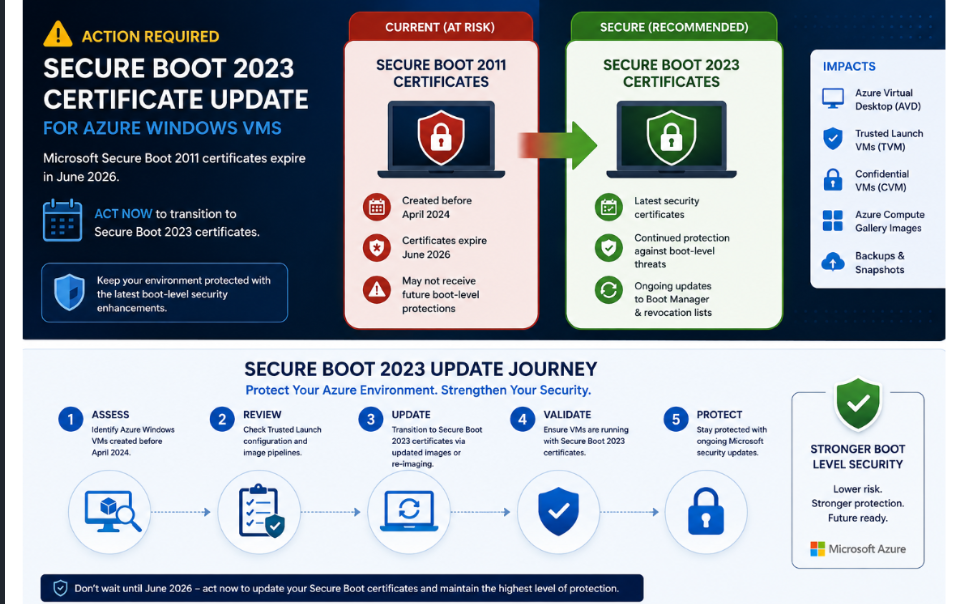
Microsoft has issued an important security advisory impacting Azure Windows virtual machines created before April 2024.
The alert focuses on the transition from older Secure Boot 2011 certificates to the newer Secure Boot 2023 certificates for:
- Azure Virtual Desktop (AVD)
- Windows 365
- Trusted Launch VMs
- Confidential VMs
- Azure Compute Gallery images
- Older VM snapshots and backups
👉 Microsoft’s official guidance:
Microsoft Secure Boot 2023 Certificate Guidance
🧠 Why This Matters
In June 2026:
Microsoft Secure Boot 2011 certificates will expire
Although your virtual machines will continue to boot and receive standard Windows updates, systems remaining on the old certificates will no longer receive the latest boot-level security protections.
🚨 What Could Be Impacted?
This specifically affects:
- Azure Windows VMs created before April 2024
- Long-running AVD session hosts
- Trusted Launch VMs
- Confidential VMs
- Older golden images
- Azure Compute Gallery images
- Legacy snapshots and backups
🔐 What Is Secure Boot?
Secure Boot helps protect systems during the boot process by validating trusted boot components before Windows loads.
This protects against:
- Bootkits
- Rootkits
- Bootloader tampering
- Early-stage malware attacks
⚠️ The Risk of Staying on Older Certificates
Systems remaining on Secure Boot 2011 certificates may no longer receive:
- Updates to Windows Boot Manager
- Secure Boot revocation database updates
- Protections against newly discovered boot vulnerabilities
Over time, this weakens the security posture of the VM.
🎯 Why This Is Important for AVD & Nerdio Customers
AVD environments often contain:
- Persistent host pools
- Long-running session hosts
- Shared image templates
- Azure Compute Gallery images
- Trusted Launch deployments
Many enterprises also use:
- Nerdio Image Management
- Re-image workflows
- Autoscale with older templates
👉 Meaning:
Older Secure Boot certificates can silently persist across the estate if not reviewed.
🧩 Common AVD Scenarios at Risk
| Scenario | Potential Risk |
|---|---|
| Long-lived pooled hosts | Still using older Secure Boot chain |
| Older custom images | Replicated outdated certificates |
| Azure Compute Gallery images | Legacy image inheritance |
| DR snapshots / backups | Recovery may restore old certificate state |
| Trusted Launch AVD hosts | Security baseline drift |
⚡I have a ps1 report script within the “References” section of this kb⚡
🔄 How This Affects Nerdio Environments
Nerdio customers should review:
- Host pool templates
- Golden images
- Azure Compute Gallery versions
- Existing session hosts
- Backup and DR images
⚙️ Recommended Actions
✅ 1. Inventory Existing AVD Session Hosts
Identify:
- VMs created before April 2024
- Older image templates
- Long-running hosts
✅ 2. Review Trusted Launch Configuration
Check:
- Secure Boot enabled
- vTPM enabled
- Trusted Launch enabled (where appropriate)
✅ 3. Validate Image Pipelines
If using:
- Azure Compute Gallery
- Nerdio Image Management
- Custom images
👉 Ensure new image versions inherit updated Secure Boot certificates.
✅ 4. Rebuild Older Hosts
For many environments, the safest path is:
- Create updated image/template
- Re-image or redeploy hosts
This aligns well with:
- Nerdio Autoscale
- Host pool re-image workflows
✅ 5. Review Backup & DR Strategy
Older snapshots and backups may still contain legacy Secure Boot chains.
Review:
- Recovery workflows
- Retention periods
- DR templates
⚡I have a ps1 report script within the “References” section of this kb⚡
🧠 FABS Insight
👉 This isn’t just a Windows update issue
👉 It’s a platform security lifecycle issue
Many organisations focus on:
- Patching
- Antivirus
- Identity
But forget:
- Boot-level trust
- VM lifecycle security
- Image inheritance
⚡ Opportunity for AVD Modernisation
This is also a great opportunity to:
- Refresh older host pools
- Update image management processes
- Standardise Trusted Launch
- Review security baselines
For Nerdio-managed environments:
👉 Use this event as a trigger to modernise your image lifecycle strategy.
🔍 Key Questions to Ask
- Are your AVD hosts older than April 2024?
- Are your images inherited from older VMs?
- Are your DR backups restoring outdated boot certificates?
- Have you validated Trusted Launch compliance recently?
🏁 Final Thoughts
Microsoft has provided significant notice before the June 2026 expiration, but large AVD estates can take time to review and modernise.
The biggest risk isn’t immediate outage.
It’s:
⚠️ Gradual degradation of boot-level security protections over time
For AVD and Nerdio customers, this should become part of your:
- Image management strategy
- Security governance
- Lifecycle planning
🔗 References
Click Here To Return To Blog