Introduction
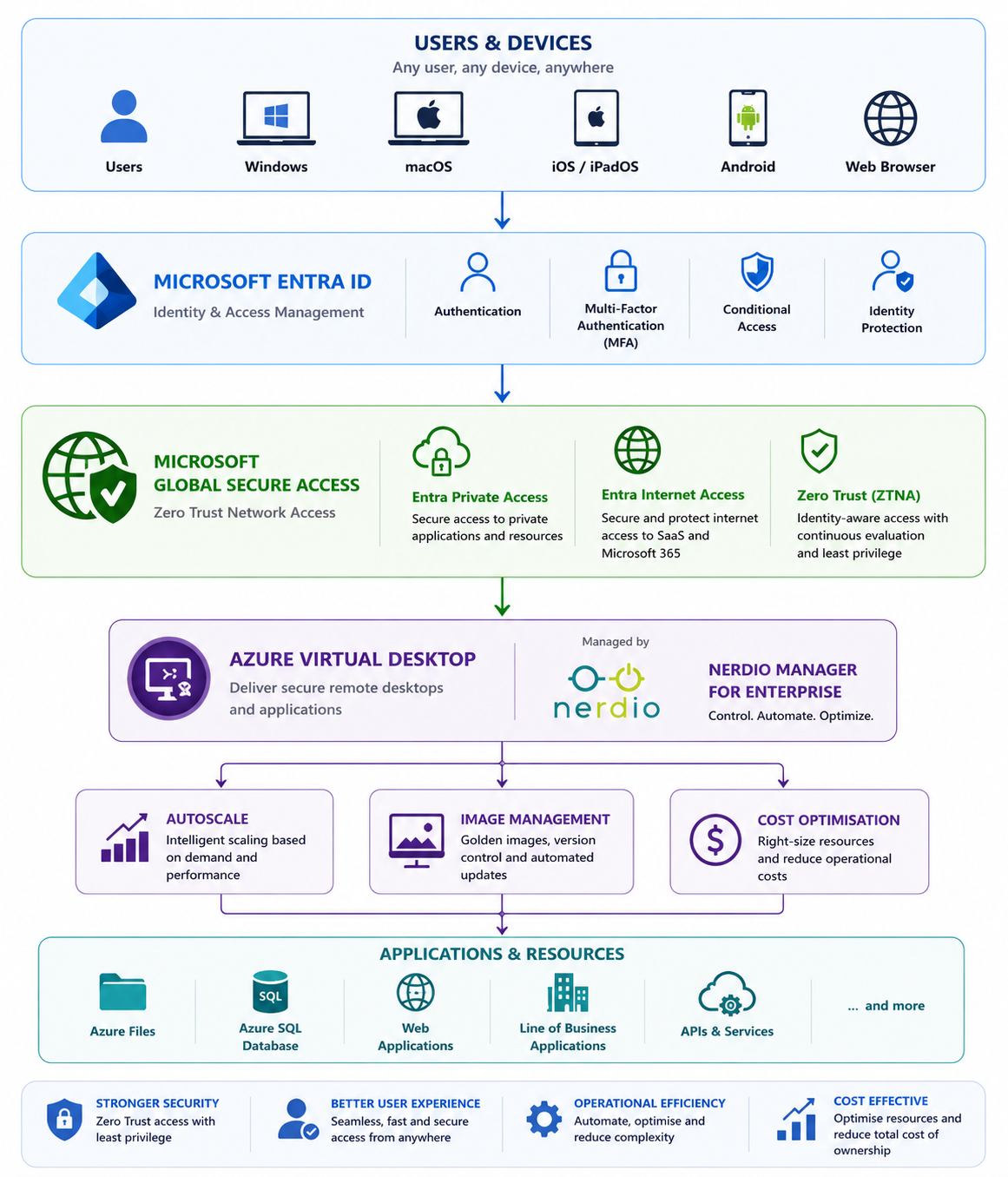
Azure Virtual Desktop provides one of the most secure remote desktop platforms available today, while Nerdio Manager for Enterprise simplifies deployment, automation, cost optimisation and ongoing management.
Microsoft Global Secure Access (GSA) adds another critical layer by introducing identity-aware, Zero Trust connectivity across users, devices and applications.
Rather than viewing these as separate technologies, organisations should think of them as complementary services:
- Azure Virtual Desktop delivers the desktop experience.
- Nerdio Manager manages and automates the platform.
- Microsoft Global Secure Access secures user access.
- Microsoft Entra governs identity.
- Microsoft Intune ensures endpoint compliance.
Together they form a modern, cloud-native End User Computing platform.
A Modern Reference Architecture
Where Nerdio Fits
Many customers ask:
"Does Nerdio replace Global Secure Access?"
No.
Nerdio focuses on operational management of Azure Virtual Desktop.
Global Secure Access focuses on identity-aware connectivity.
Think of it this way:
| Microsoft Global Secure Access | Nerdio Manager |
|---|---|
| Identity Security | Platform Management |
| Zero Trust | Automation |
| Secure Connectivity | Image Lifecycle |
| Private Access | Autoscaling |
| Conditional Access | Cost Optimisation |
| Internet Access | Monitoring |
| Session Security | Deployment |
Together they provide a complete solution.
Benefits of Combining GSA with Nerdio
1. Secure Every User Connection
Global Secure Access ensures every connection is evaluated based on:
- User identity
- Device compliance
- MFA
- Location
- Risk level
- Authentication strength
Nerdio doesn't need to manage these policies—it simply benefits from a more secure access layer.
2. Automated Host Deployment
Nerdio can automatically:
- Deploy session hosts
- Re-image hosts
- Scale environments
- Apply golden images
- Join Entra ID
- Install applications
When those hosts are accessed through Global Secure Access, every user session is protected by Microsoft's Zero Trust policies.
3. Secure Administrative Access
One often-overlooked advantage is protecting administrator access.
Administrators frequently connect to:
- Azure Portal
- Nerdio Manager
- Azure Virtual Desktop
- Azure Storage
- Azure SQL
- Azure Key Vault
By combining:
- Conditional Access
- Global Secure Access
- Privileged Identity Management (PIM)
administrative access becomes significantly more secure.
Secure Image Management
One of Nerdio's biggest strengths is image lifecycle management.
Combine that with:
- Intune Compliance
- Defender for Endpoint
- Global Secure Access
- Conditional Access
and every newly deployed session host immediately inherits your organisation's security posture.
Protecting Supporting Services
Azure Virtual Desktop relies on numerous supporting Azure services.
Examples include:
- Azure Files
- Azure NetApp Files
- Azure Key Vault
- Azure SQL Database
- Storage Accounts
- Log Analytics
- Application Insights
Microsoft Global Secure Access helps ensure administrators securely access these services, while Nerdio automates their use during deployment and day-to-day operations.
Operational Best Practices
When deploying Global Secure Access alongside Nerdio, consider the following:
Identity
✔ Enable Microsoft Entra MFA.
✔ Use Authentication Strengths.
✔ Enable Identity Protection.
Devices
✔ Require Intune compliant devices.
✔ Deploy Microsoft Defender for Endpoint.
✔ Use Windows App where possible.
Nerdio
✔ Enable Autoscale.
✔ Use Image Management.
✔ Configure Scripted Actions.
✔ Standardise golden images.
✔ Use Host Pool Profiles.
Azure
✔ Use Azure Files with Microsoft Entra Kerberos.
✔ Deploy Private Endpoints.
✔ Enable Azure Resource Locks for Nerdio resources.
✔ Protect Key Vault.
✔ Use Azure Backup where appropriate.
Monitoring
✔ Microsoft Sentinel
✔ Azure Monitor
✔ Nerdio Real-Time Insights
✔ Nerdio Operational Efficiency Insights
✔ Intune Device Analytics
Suggested Enterprise Architecture
| Layer | Technology |
|---|---|
| Identity | Microsoft Entra ID |
| Authentication | MFA / Passwordless |
| Endpoint Compliance | Microsoft Intune |
| Device Protection | Microsoft Defender |
| Zero Trust Access | Microsoft Global Secure Access |
| Desktop Platform | Azure Virtual Desktop |
| Platform Management | Nerdio Manager for Enterprise |
| Profiles | FSLogix |
| Storage | Azure Files |
| Monitoring | Azure Monitor + Nerdio Real-Time Insights |
| Automation | Nerdio Scripted Actions |
| Governance | Azure Policy + Azure Resource Locks |
Common Deployment Scenarios
New Greenfield AVD Deployment
- Microsoft Entra joined session hosts
- Azure Files with Microsoft Entra Kerberos
- Global Secure Access
- Nerdio Image Management
- Nerdio Autoscale
- Windows App
- Microsoft Intune
Existing Enterprise Migration
- Replace legacy VPN with Global Secure Access
- Introduce Conditional Access
- Deploy Nerdio for automation
- Optimise Azure costs
- Standardise image lifecycle
Windows 365 Coexistence
Many organisations now operate:
- Azure Virtual Desktop for pooled desktops
- Windows 365 for dedicated Cloud PCs
Global Secure Access secures both platforms using the same identity and Conditional Access policies, while Nerdio continues to manage the Azure Virtual Desktop estate.
Future Opportunities
Microsoft continues to invest heavily in Global Secure Access, with deeper integration expected across Microsoft Entra, Defender, Windows App, Azure Virtual Desktop and Windows 365.
At the same time, Nerdio continues to expand automation capabilities through features such as:
- Image Management
- Host Pool Profiles
- Azure Capacity Extender
- Host Pool Disaster Recovery
- Scripted Actions
- Rolling Drain Mode
- Intune Insights
- Real-Time Insights
- Operational Efficiency Insights
- Cost Attribution
- Console Connect
The combination of Microsoft's Zero Trust platform and Nerdio's operational automation creates a compelling foundation for modern End User Computing.
Conclusion
Microsoft Global Secure Access and Nerdio Manager for Enterprise solve different challenges—but together they deliver a secure, efficient and highly automated Azure Virtual Desktop platform.
Global Secure Access ensures that every user connection is continuously evaluated using Microsoft's Zero Trust principles, while Nerdio simplifies the operational complexity of deploying, managing and optimising Azure Virtual Desktop environments.
For organisations standardising on Microsoft technologies, this combination provides a future-ready architecture that strengthens security, reduces administrative overhead and improves the end-user experience without sacrificing flexibility or scalability.
Microsoft Documentation
I recommend linking to:
- Microsoft Global Secure Access overview
- Microsoft Entra Private Access
- Microsoft Entra Internet Access
- Useful Videos
| Part | Topic |
|---|---|
| Part 1 | What is Microsoft Global Secure Access? Benefits, Zero Trust concepts and competitor comparison |
| Part 2 | Using Microsoft Global Secure Access with Azure Virtual Desktop and Windows 365 |
| Part 3 | Building a secure, automated Azure Virtual Desktop platform with Microsoft Global Secure Access and Nerdio Manager for Enterprise |
Click Here To Return To Blog