🧠 What Is Intune Multi-Admin Approval (MAA)?
Multi-Admin Approval (MAA) is a feature in Microsoft Intune that requires multiple administrators to approve sensitive actions before they are executed.
MMA policies are supported for the following resources:
Apps – Applies to app deployments, but doesn't apply to app protection policies.
Compliance policies - Applies to creating and managing compliance policies.
Configuration policies - Applies to creating and managing policies via the settings catalog.
Device actions - Applies to wipe, retire and delete device actions.
Role-based access control – Applies to changes to roles, including modifications to role permissions, admin groups, or member group assignments.
Scripts – Applies to deploying scripts to devices that run Windows.
Access Policies - Applies to creating or managing multiple administrative approval policies.
Tenant Configuration - Applies to managing device categories, including creating, editing or deleting them.
MAA enforces:
👉 “Two-person integrity” (TPI) — similar to controls used in high-security environments.
Guide on how to create Multi Admin Approval Policy
⚙️ How MAA Works
When MAA is enabled:
- An administrator initiates a sensitive action
- The action is placed into a pending approval state
- A second authorised administrator must:
- Review
- Approve (or reject)
4. Only then is the action executed
🚨 Why This Matters: Lessons from Recent Breaches
In recent high-profile incidents (including the Stryker breach), attackers exploited:
- Compromised admin credentials
- Over-permissioned roles
- Lack of approval workflows
- Ability to execute destructive or high-impact actions quickly
🔍 Common Attack Pattern
A typical sequence looks like:
- Attacker gains access to an admin account
- Executes high-impact actions such as:
- Device deletion
- Policy modification
- Endpoint wipe
3. No approval barrier exists
4. Damage occurs before detection
🛡️ Where MAA Changes the Game
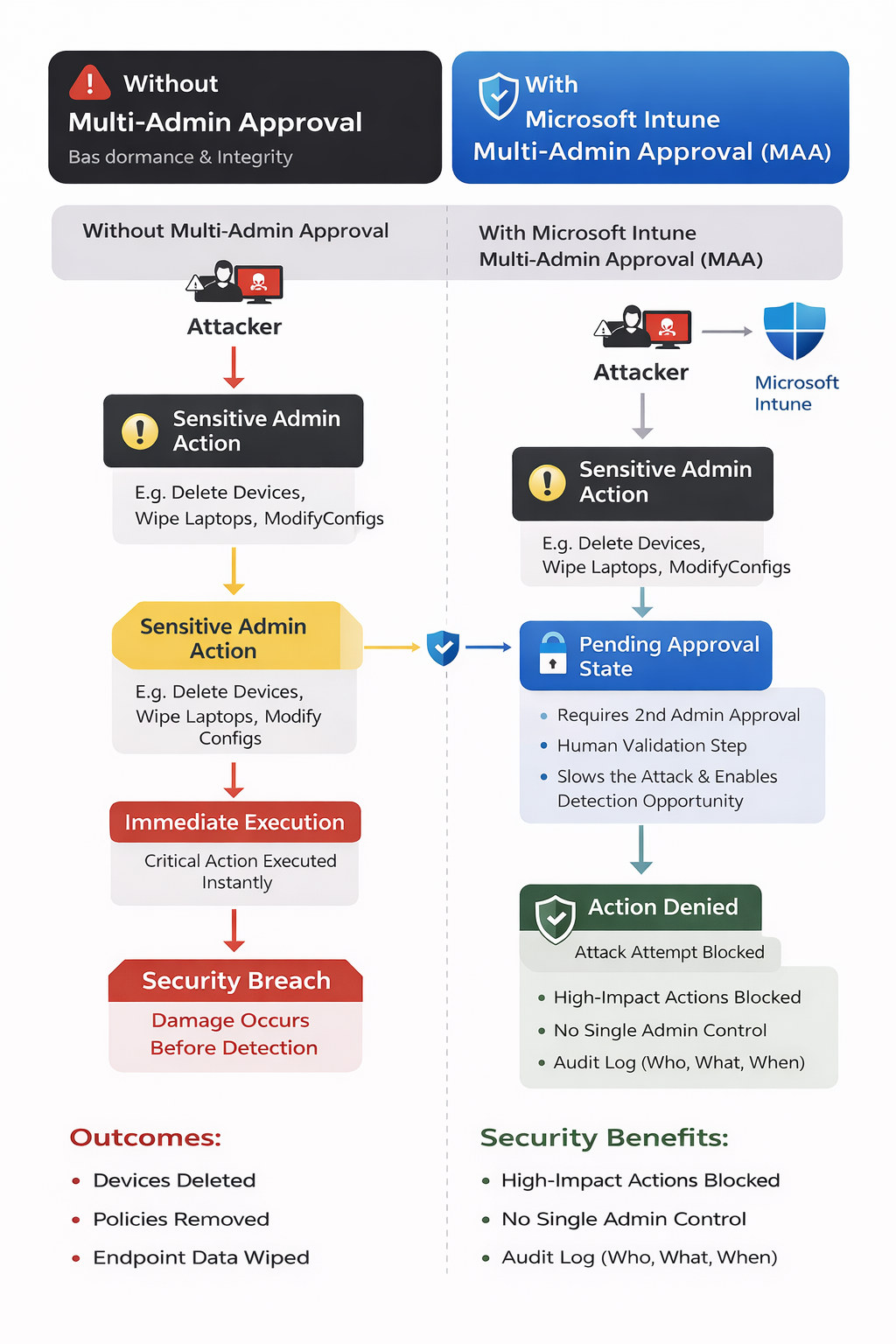
Multi-Admin Approval introduces a critical control point in this attack chain.
Without MAA
Compromise → Admin Action → Immediate Execution → Impact
With MAA
Compromise → Admin Action → Approval Required → Detection Opportunity → Action Blocked
🎯 Key Security Benefits
✅ Breaks the Attack Chain
Even if an attacker compromises an admin account:
- They cannot execute sensitive actions alone
✅ Introduces Human Validation
A second admin provides:
- Context validation
- Risk awareness
- Opportunity to detect anomalies
✅ Slows Down Attackers
MAA introduces time and friction, which is critical:
- Faster attacks = higher impact
- Slower attacks = more chance to detect and respond
✅ Improves Auditability
- Full visibility into:
- Who initiated actions
- Who approved them
- Supports compliance and forensic analysis
⚠️ Why This Is Especially Important
For organisations using:
- Azure Virtual Desktop (AVD)
- Windows 365
- Intune Enrolled Endpoints
Intune plays a critical role in:
- Device lifecycle management
- Policy enforcement
- Endpoint security
Example Risk Scenario
If a privileged account is compromised:
- Devices could be deleted
- Policies removed
- Security baselines altered
🔐 With MAA Enabled - It Could Have Helped Prevent a Major Endpoint Security Breach
Security incidents in modern enterprise environments rarely come down to a single failure. More often, they are the result of privileged actions executed without sufficient oversight.
One of the most important (and often overlooked) controls in endpoint management is approval governance for sensitive administrative actions.
Microsoft has introduced exactly this capability in Intune:
This feature introduces a critical control layer that aligns with Zero Trust and least privilege principles, and could have significantly reduced the risk of high-impact breaches such as the recent Stryker incident.
⚙️ How to Enable Multi-Admin Approval🧠 FABS Solutions Perspective
Multi-Admin Approval is not just a feature — it’s a critical governance control.
In modern cloud environments:
Identity compromise is not “if” — it’s “when”
Controls like MAA ensure that:
- A single compromised account does not equal full compromise
- High-impact actions require verification and accountability
🏁 Final Thoughts
The introduction of Multi-Admin Approval in Intune reflects a broader shift:
👉 From trusting administrators
👉 To verifying administrative actions
Had this control been in place and enforced correctly, it could have:
- Slowed down attackers
- Introduced detection points
- Prevented or reduced the impact of destructive actions
🔗 Learn More
👉 Microsoft Intune Multi-Admin Approval
Guide on how to create Multi Admin Approval Policy
Click Here To Return To Blog