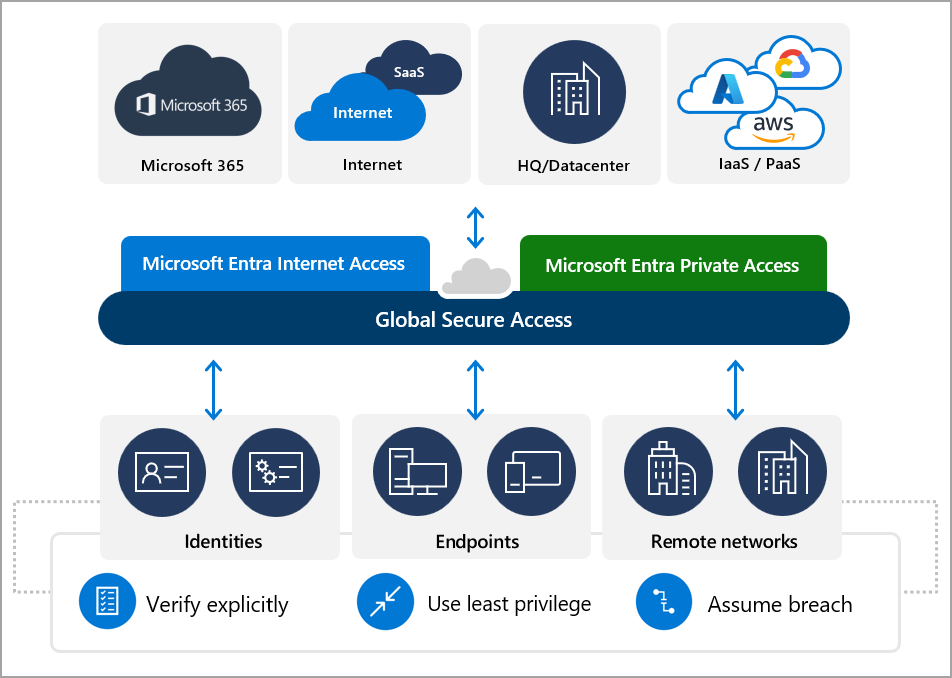
What is Microsoft Global Secure Access?
Organisations are rapidly moving away from traditional VPNs towards Zero Trust Network Access (ZTNA) solutions that continuously verify users, devices and applications before granting access to corporate resources.
Microsoft Global Secure Access (GSA) is Microsoft's Security Service Edge (SSE) platform, built natively into the Microsoft Entra ecosystem. Rather than simply providing a secure tunnel into a corporate network, GSA focuses on identity-aware access, ensuring users only receive access to the applications and resources they need.
By combining Microsoft Entra Private Access, Microsoft Entra Internet Access, and Microsoft Defender for Cloud Apps, organisations can secure access to both private and SaaS applications while improving user experience and reducing reliance on traditional VPN infrastructure.
For organisations already invested in Microsoft 365, Azure and Microsoft Entra, Global Secure Access extends Zero Trust principles without introducing another identity platform.
Why Organisations are Moving Away from VPNs
Traditional VPN solutions were designed for a very different era.
Users connected to an entire corporate network regardless of which application they needed. Once authenticated, they often had broad network visibility, increasing the potential impact of compromised credentials.
Modern security strategies now assume that no user or device should be trusted by default.
Microsoft's Zero Trust model follows three key principles:
- Verify explicitly.
- Use least-privilege access.
- Assume breach.
Global Secure Access has been designed around these principles from the ground up.
Core Components of Microsoft Global Secure Access
Microsoft Entra Private Access
Provides secure access to internal applications without exposing them directly to the Internet.
Typical workloads include:
- Azure Virtual Desktop
- Windows 365
- File servers
- SQL Servers
- Internal web applications
- Legacy line-of-business applications
Microsoft Entra Internet Access
Protects outbound Internet traffic by applying identity-aware Conditional Access policies to Microsoft 365 applications and selected SaaS services.
This allows organisations to:
- Enforce compliant devices
- Apply location-based policies
- Protect Microsoft 365 traffic
- Improve visibility
Microsoft Defender for Cloud Apps
Works alongside GSA to provide:
- Session controls
- Shadow IT discovery
- Data protection
- Risk detection
- Application governance
Key Benefits
Zero Trust Security
Access decisions are continuously evaluated using:
- User identity
- Device compliance
- Risk score
- Location
- Authentication strength
- Conditional Access
Unlike VPNs, trust is never permanent.
Better User Experience
Instead of manually connecting to VPN software:
Users authenticate once.
Access is transparent.
Applications simply work.
This is particularly valuable for remote workers.
Native Microsoft Integration
One of Microsoft's biggest advantages is integration.
Global Secure Access works alongside:
- Microsoft Entra ID
- Conditional Access
- Microsoft Intune
- Microsoft Defender XDR
- Microsoft Sentinel
- Windows App
- Azure Virtual Desktop
- Windows 365
No third-party identity synchronisation is required.
Simplified Administration
Administrators manage access from Microsoft Entra rather than maintaining multiple security platforms.
Policies can be reused across:
- Microsoft 365
- Azure
- SaaS
- Private Applications
Enhanced Visibility
Administrators gain detailed insights including:
- User connections
- Device health
- Application access
- Conditional Access evaluations
- Traffic analytics
Microsoft Global Secure Access vs Traditional VPN
| Feature | Traditional VPN | Microsoft GSA |
|---|---|---|
| Network-level access | Yes | No |
| Application-level access | Limited | Yes |
| Zero Trust | No | Yes |
| Identity-aware | Limited | Native |
| Conditional Access | Limited | Native |
| Continuous evaluation | No | Yes |
| Device compliance | Limited | Yes |
| Internet access protection | No | Yes |
| Microsoft integration | Basic | Excellent |
Microsoft GSA vs Leading Competitors
| Feature | Microsoft GSA | Zscaler | Netskope | Palo Alto Prisma Access | Cisco Secure Access |
|---|---|---|---|---|---|
| Microsoft Entra integration | ⭐⭐⭐⭐⭐ | ⭐⭐⭐ | ⭐⭐⭐ | ⭐⭐⭐ | ⭐⭐⭐ |
| Conditional Access integration | ⭐⭐⭐⭐⭐ | ⭐⭐ | ⭐⭐ | ⭐⭐ | ⭐⭐ |
| Windows 365 support | Native | Good | Good | Good | Good |
| Azure Virtual Desktop integration | Native | Good | Good | Good | Good |
| Microsoft 365 optimisation | Excellent | Good | Good | Good | Good |
| Identity-first architecture | Excellent | Excellent | Excellent | Excellent | Good |
| Single vendor experience | Yes | No | No | No | No |
Why Microsoft Customers Should Consider GSA
If your organisation already uses:
- Microsoft Entra
- Microsoft Intune
- Azure
- Microsoft Defender
- Microsoft Sentinel
- Azure Virtual Desktop
- Windows 365
then Global Secure Access becomes a natural extension of the Microsoft security ecosystem.
Rather than introducing another identity platform or additional policy engine, organisations can build on existing Conditional Access policies, device compliance rules and identity governance.
This simplifies administration while delivering a consistent Zero Trust experience across users, devices and applications.
Current Considerations
Although Global Secure Access has matured significantly, organisations should evaluate:
- Supported applications and protocols
- Network architecture
- Client deployment strategy
- Private Access connector placement
- Licensing requirements
- Migration from existing VPN or SSE solutions
A phased rollout alongside existing remote access solutions is often the most practical approach.
Coming Next
This is the first article in a three-part series.
Microsoft Documentation
I recommend linking to:
- Microsoft Global Secure Access overview
- Microsoft Entra Private Access
- Microsoft Entra Internet Access
- Useful Videos
Click Here To Return To Blog