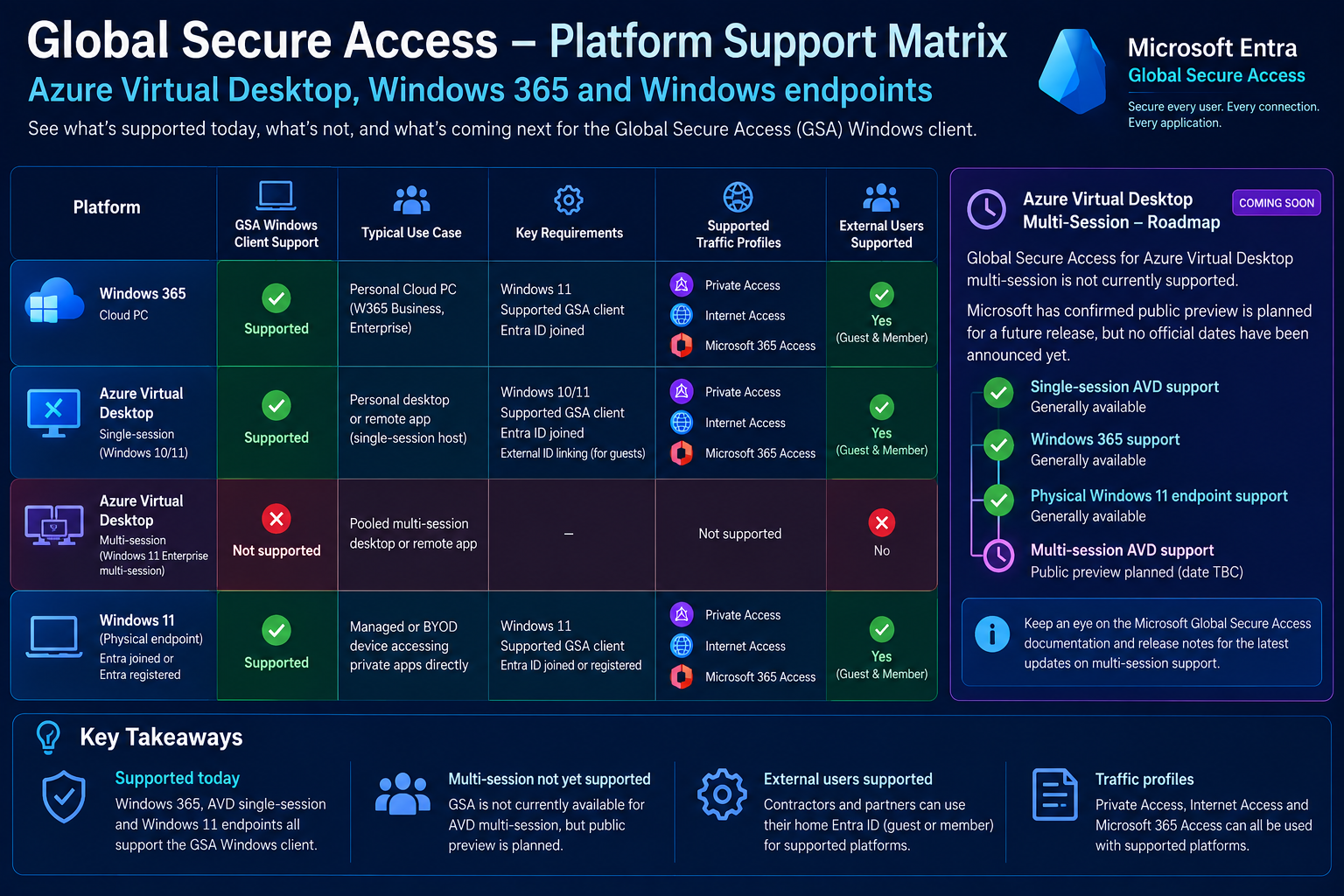
Updated for October 2026
Global Secure Access is changing how organisations secure Azure Virtual Desktop, Windows 365 and corporate applications. By combining identity-aware networking, Conditional Access, external identities and compliant network enforcement, organisations can move beyond traditional VPN security towards a more consistent Zero Trust architecture. But understanding where GSA is supported—and where it isn't—is essential before deployment.
Previously on Fabs Solutions: Global Secure Access
This article builds on two previous Fabs Solutions publications:
1. Microsoft Global Secure Access for Azure Virtual Desktop & Windows 365 - Our original introduction to Global Secure Access, exploring its role in securing Azure Virtual Desktop, Windows 365 and corporate resources through identity-aware network connectivity.
2. Microsoft Global Secure Access + Nerdio Manager for Enterprise - A closer look at how Nerdio Manager for Enterprise complements GSA through Azure Virtual Desktop lifecycle management, automation and operational control.
In this follow-up, we're moving beyond the fundamentals and examining the security architecture in greater technical detail.
We'll explore how GSA can reduce stolen-token replay risk, how external identities work across Microsoft Entra tenants, how Conditional Access evaluates compliant networks, and what architects must consider when deploying GSA alongside Azure Virtual Desktop and Windows 365.
Watch: How Global Secure Access Works
Before exploring the architecture in detail, this short video segment provides a useful visual explanation of how Microsoft Global Secure Access works and how it fits into a modern Zero Trust security model.
The video provides useful context for the technical sections that follow, particularly around identity-aware network access and Conditional Access.
Video credit: Original YouTube creator. Linked to the relevant segment for educational reference.
1. Why Global Secure Access Matters for Modern EUC
Traditional enterprise networking has historically depended on a relatively straightforward assumption: users connected to the corporate network are more trustworthy than users outside it.
VPNs, network segmentation, firewalls and private network routes have all played important roles in securing corporate applications.
However, this model becomes increasingly difficult to maintain when organisations support:
- Remote and hybrid workers
- Contractors and third-party suppliers
- Azure Virtual Desktop and Windows 365 Cloud PCs
- SaaS and Microsoft 365 applications
- Private applications hosted in Azure or on-premises
- Devices that are not fully managed by the organisation
Microsoft Global Secure Access introduces an identity-aware approach to controlling access to these resources.
Rather than relying solely on where a device is connected, organisations can combine Microsoft Entra identity, Conditional Access, device security signals and network-level controls.
The three Global Secure Access traffic profiles
| Traffic profile | Purpose | |
|---|---|---|
| Microsoft traffic | Secures supported Microsoft service traffic, including Microsoft 365 workloads | |
| Microsoft Entra Private Access | Provides Zero Trust Network Access to private applications and resources | |
| Microsoft Entra Internet Access | Applies security policies to internet-bound traffic |
These capabilities are complementary, but they are not interchangeable. Each has distinct licensing, routing and configuration requirements.
For AVD and Windows 365, the important architectural question becomes: where should the GSA client operate, and which traffic needs protection?
2. Understanding GSA Client Placement in AVD and Windows 365
An important distinction often overlooked in GSA architecture discussions is the difference between protecting the endpoint used to connect to a virtual desktop and protecting traffic generated inside the virtual desktop itself.
Scenario A: GSA on the physical endpoint
A user connects from a managed Windows 11 laptop running the Global Secure Access client.
The client can apply the organisation's configured traffic forwarding policies to supported traffic originating from that physical endpoint.
However, installing GSA on the physical device does not automatically mean that all traffic generated inside a remote AVD session is protected by the same GSA tunnel.
The virtual desktop is a separate execution environment with its own network connectivity.
Scenario B: GSA inside the virtual desktop
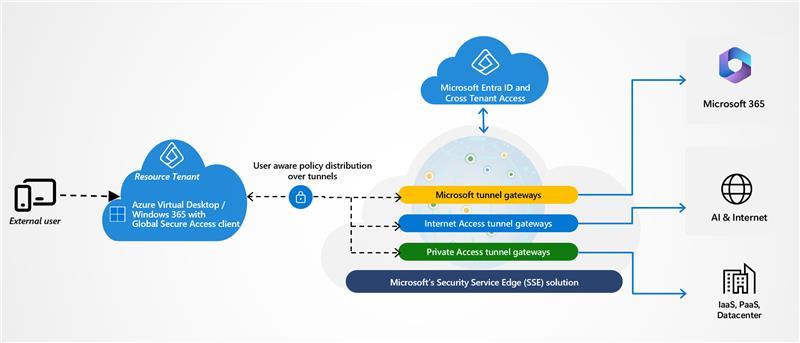
For supported single-session AVD deployments and Windows 365 Cloud PCs, the GSA Windows client can operate inside the virtual machine.
This allows traffic generated by applications running within the virtual desktop to be evaluated and forwarded according to the relevant GSA policies.
Examples include access to internal web applications, Microsoft 365 services and private line-of-business applications.
Architecture consideration: The RDP connection used to reach the virtual desktop and the application traffic originating inside the virtual desktop are different traffic flows. GSA should not be treated as a replacement for Azure Virtual Desktop Reverse Connect, RDP Shortpath or RDP Multipath.
3. Global Secure Access Platform Support
Before deploying GSA into an End User Computing environment, architects must establish which operating systems and session models are supported.
| Platform | GSA Windows client support | |
|---|---|---|
| Windows 11 physical endpoint | Supported | |
| Windows 365 Cloud PC | Supported | |
| AVD single-session | Supported | |
| AVD multi-session | Not supported | |
| Windows Server RDS multi-session | Not supported |
This distinction is especially important for enterprises using pooled Windows 11 Enterprise multi-session host pools.
What about AVD multi-session support?
As of October 2026, Microsoft's published GSA Windows client documentation still identifies concurrent multi-session environments as unsupported.
Microsoft has not provided a publicly verifiable release date for an AVD multi-session preview in the documentation reviewed for this article.
Until Microsoft announces formal support, organisations should not deploy the GSA Windows client into production AVD multi-session host pools on the assumption that it will function correctly for concurrent users.
Instead, assess supported endpoint-side GSA deployment, appropriate private connectivity and other security controls according to the workload requirements.
4. Protecting Against Stolen Tokens with Compliant Network
One of the most interesting security capabilities associated with Global Secure Access is its integration with Microsoft Entra Conditional Access through the Compliant Network signal.
This addresses a significant identity-security concern: stolen authentication tokens.
🎬 Watch: Microsoft Entra Compliant Network — How It Works
How does Global Secure Access help prevent an attacker from reusing a stolen authentication token?
This video segment demonstrates the concept of Compliant Network, showing how Microsoft Entra Conditional Access can evaluate whether an authentication request originates from an organisation's approved Global Secure Access network.
Key takeaway: Even when an attacker possesses a valid stolen token, a Conditional Access policy requiring a compliant network can block access if the request comes from outside the approved GSA network context.
This is an additional security layer alongside MFA, device compliance and supported token protection capabilities. It does not make every stolen token universally unusable.
Video credit: Original YouTube creator. Linked directly to the relevant technical demonstration.
Legitimate employee
- Signs in from a managed Windows endpoint.
- Connects through the organisation's Global Secure Access service.
- Requests access to a protected application.
- Microsoft Entra evaluates the user's identity, applicable Conditional Access policies and compliant network signal.
- Access is permitted when all required conditions are satisfied.
Attacker using a stolen token
- Obtains a user's authentication token.
- Attempts to reuse the token from an untrusted network.
- Requests access to an application protected by a compliant network policy.
- Microsoft Entra evaluates the request.
- Access is denied when the request fails the compliant network requirement.
This significantly reduces the usefulness of stolen tokens in covered authentication scenarios.
Microsoft reference: Enable Compliant Network Check with Conditional Access
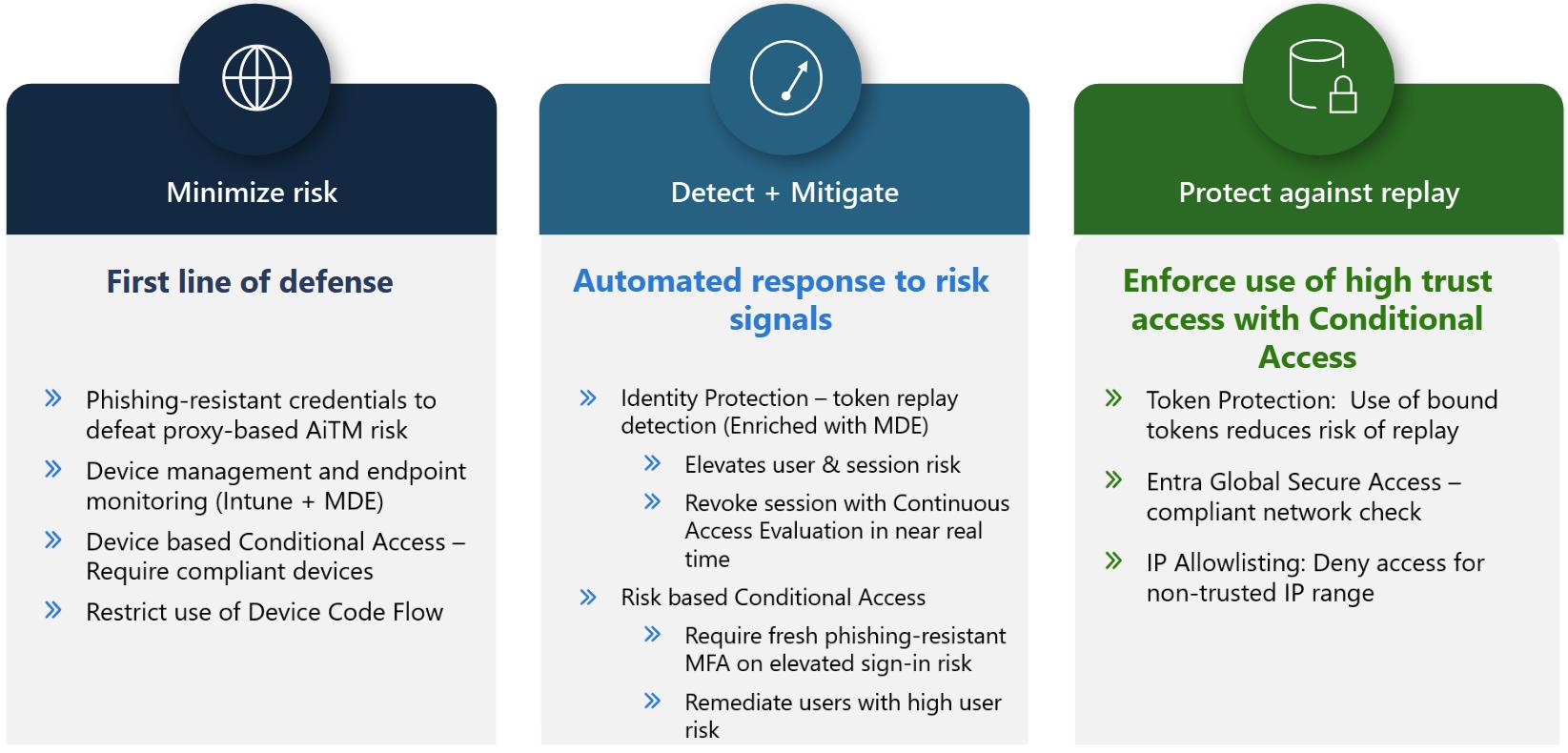
5. Compliant Network vs Token Protection vs Continuous Access Evaluation
Although these technologies are related, they address different parts of the authentication and authorisation lifecycle.
| Capability | Primary purpose | |
|---|---|---|
| Compliant Network | Restricts access based on a tenant-specific GSA network signal | |
| Token Protection | Reduces token replay risk by binding supported tokens to a device | |
| Continuous Access Evaluation (CAE) | Allows supported applications to respond to certain security and policy changes without waiting for normal token expiry | |
| Device Compliance | Evaluates whether an endpoint satisfies defined Intune compliance policies | |
| Authentication Strength | Controls the authentication methods permitted for access |
These technologies are most effective when designed as complementary security layers.
Example enterprise policy design
An organisation could require:
- Phishing-resistant MFA for sensitive applications
- An Intune-compliant device
- Access through the organisation's GSA compliant network
- Token Protection for supported applications and clients
- Continuous Access Evaluation where supported
However, support varies by application, platform and authentication flow.
Important: Compliant Network should not be described as universally invalidating every stolen access token. Its effectiveness depends on the resource, authentication flow and enforcement capabilities. Existing application sessions may behave differently from new authentication requests.
6. Global Secure Access for External Users and Contractors
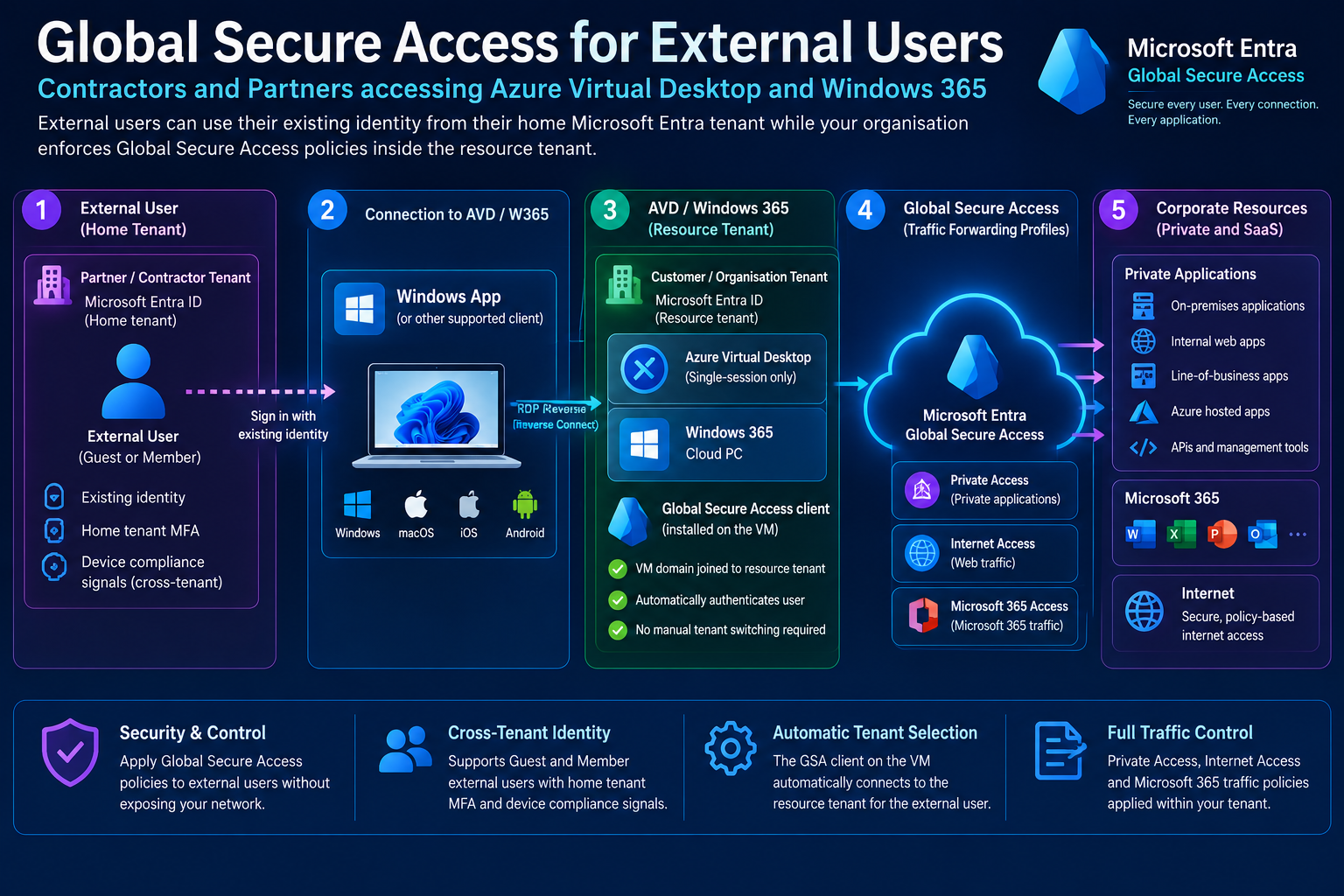
Another significant development is Microsoft's documented support for external-user access through Global Secure Access.
This is particularly relevant for organisations providing desktops, Cloud PCs and applications to third-party users.
Examples include consultants, outsourced support teams, suppliers, partner organisations and temporary project workers.
Home tenant vs resource tenant
The architecture involves two Microsoft Entra tenants.
Home tenant: The organisation where the external user's identity originates.
Resource tenant: The organisation hosting the AVD or Windows 365 environment and the applications being accessed.
The external user can authenticate using their existing home-tenant identity while accessing authorised resources in the resource tenant.
This model can reduce the need for separate internal user identities, although application compatibility, licensing and identity provisioning requirements must still be considered.
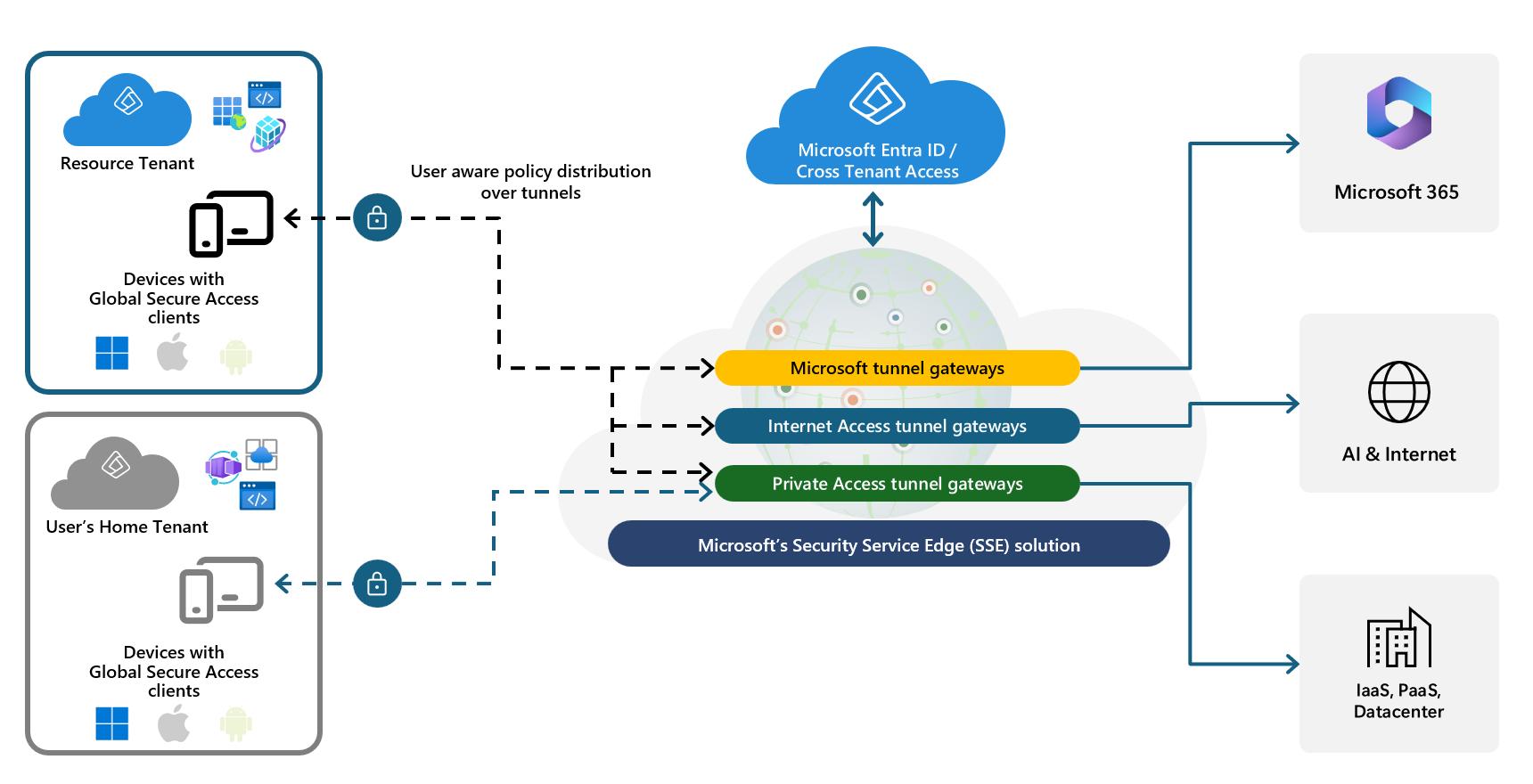
How the GSA integration works
Microsoft documents the following configuration sequence:
- Configure external ID linking for the supported Azure Virtual Desktop or Windows 365 virtual machine.
- Onboard the resource tenant to Global Secure Access.
- Configure the appropriate GSA traffic forwarding profiles and assign them to external identities.
- Install and configure the GSA client inside the supported virtual machine.
Once configured, the GSA client can automatically connect to the resource tenant using the external identity associated with the virtual machine.
This removes the need for the user to manually switch tenant context inside that supported virtual desktop scenario.
What can the resource tenant control?
Depending on licensing and configuration, the resource tenant can apply appropriate GSA controls to traffic accessing:
- Private corporate applications
- Microsoft 365 services
- Internet destinations
- Internal web applications and line-of-business services
This creates a more consistent security architecture for both employees and authorised external users.
Microsoft reference: Global Secure Access External User Access
7. External Identity Security Considerations
Cross-tenant access introduces additional security design decisions.
MFA and device trust
Microsoft Entra cross-tenant access settings can allow a resource tenant to trust supported MFA and device claims from a user's home tenant.
However, administrators should not assume that every external organisation maintains equivalent security standards.
Trust settings should be established deliberately, based on the organisation's security policies and relationship with the external tenant.
Compliant Network limitations
Microsoft documents limitations involving compliant network policies and external users accessing private applications.
These limitations must be evaluated before enforcing policies that could inadvertently prevent contractors from reaching required applications.
Session and tenant context
Changing the GSA tenant context on an external endpoint can affect traffic forwarding behaviour.
The direct BYOD GSA scenario and the VM-side GSA integration for AVD and Windows 365 should therefore be treated as separate architectural patterns.
8. Deployment Guidance for Enterprise Architects
For organisations evaluating GSA alongside Azure Virtual Desktop or Windows 365, I recommend a phased implementation.
Phase 1: Architecture assessment
Identify the target user populations, desktop types, application dependencies and security requirements.
Confirm whether the deployment uses single-session AVD, multi-session AVD or Windows 365.
Document which network flows originate on the physical endpoint and which originate inside the virtual desktop.
Phase 2: Identity and licensing
Review Microsoft Entra Conditional Access licensing, Private Access and Internet Access licensing, external-user requirements and the roles needed for administration.
Microsoft Entra ID P1 provides Conditional Access capabilities and access to the supported Microsoft traffic profile functionality. It does not automatically provide every Private Access or Internet Access feature.
Phase 3: GSA traffic forwarding
Configure the appropriate Microsoft, Private Access and Internet Access traffic profiles.
Validate private application definitions, connector placement, DNS resolution, routing and traffic exclusions.
Phase 4: Conditional Access
Introduce compliant network policies using dedicated pilot groups and applications.
Use report-only mode where supported and review policy results before wider enforcement.
Exclude emergency access accounts appropriately and maintain a documented rollback process.
Phase 5: External identities
For contractor and partner scenarios, validate external ID linking, cross-tenant trust settings, supported VM configurations and resource-tenant policy assignments.
Phase 6: Operational validation
Test application access, sign-in behaviour, token replay resistance in an authorised lab, client health, traffic forwarding and failure recovery.
Review GSA traffic logs alongside Microsoft Entra sign-in logs and Conditional Access results.
9. GSA and FSLogix: Important Architecture Considerations
FSLogix Profile Containers commonly rely on storage services such as Azure Files or Azure NetApp Files.
GSA does not automatically replace the networking, authentication and storage requirements associated with FSLogix.
example, an Azure Files-based profile architecture may depend on:
- Correct SMB connectivity
- DNS resolution
- Appropriate network routing
- Kerberos authentication
- Storage permissions
- Profile-container locking and attachment behaviour
Microsoft Entra Private Access may be relevant to certain private application connectivity scenarios, but architects should not assume that enabling GSA automatically secures or replaces every FSLogix storage path.
For AVD multi-session environments in particular, the lack of GSA Windows client support inside concurrent multi-session hosts remains an important design constraint.
10. How Nerdio Manager for Enterprise Complements GSA
For organisations using Nerdio Manager for Enterprise, GSA should be viewed as a complementary Microsoft security capability rather than a competing management platform.
The responsibilities are different.
| Technology | Primary responsibility | |
|---|---|---|
| Azure Virtual Desktop | Desktop and RemoteApp delivery | |
| Windows 365 | Cloud PC delivery and lifecycle | |
| Nerdio Manager for Enterprise | Supported AVD/W365 management, automation and operational workflows | |
| Microsoft Intune | Device and application management, configuration and compliance | |
| Microsoft Entra | Identity, authentication and Conditional Access | |
| Global Secure Access | Identity-aware traffic forwarding and network security |
Nerdio can help standardise supported deployment and management processes, while Microsoft Entra and GSA enforce the configured identity and network security policies.
Organisations should validate the exact automation and integration capabilities available in their Nerdio version rather than assuming that Nerdio directly manages all GSA settings.
11. Known Limitations and Operational Risks
Several limitations deserve attention during design and pilot testing.
AVD multi-session: The GSA Windows client does not support concurrent sessions on the same host.
External identities: Certain compliant network policies can conflict with external-user access scenarios.
Client support: Traffic forwarding capabilities can differ according to operating system, device registration state and client version.
Network compatibility: Existing proxies, VPNs, security agents, QUIC behaviour and traffic exclusions may require additional testing.
Conditional Access: Incorrect policy scoping can block legitimate access, particularly when introducing compliant network requirements.
Application support: Token Protection and Continuous Access Evaluation do not apply uniformly to every application or protocol.
A production deployment should include a pilot, documented rollback plan and clear ownership between endpoint, identity, networking and EUC teams.
12. Final Thoughts: GSA Is Becoming an Important Part of the Modern EUC Security Architecture
For me, the most interesting aspect of Global Secure Access isn't simply the ability to replace parts of a traditional VPN architecture.
It's the opportunity to bring identity, device security, network connectivity and application access together under a more consistent Zero Trust model.
For organisations deploying Azure Virtual Desktop and Windows 365, this becomes especially valuable when supporting remote workers, contractors and complex partner ecosystems.
However, successful adoption depends on understanding the architectural boundaries.
GSA does not replace AVD connectivity technologies. It does not automatically secure every virtual desktop traffic flow. And it is not currently supported inside AVD multi-session hosts.
Where supported, combining Global Secure Access with Microsoft Entra Conditional Access, Intune, AVD, Windows 365 and appropriate management tooling provides a compelling foundation for securing modern End User Computing environments.
The priority should be to deploy these capabilities deliberately, validate their behaviour and apply the right controls to the right traffic flows.
Microsoft Technical References
- Global Secure Access documentation
- GSA Windows Client Installation and Prerequisites
- External User Access
- Compliant Network Check
- Current Known Limitations
- Global Secure Access Overview and Licensing
Click Here To Return To Blog